
Workflow for Manufacturing Companies: From Approval to Operations With Context, Evidence and AI Assistance
2026-10-07
Executive Summary
- Workflow in small and mid-sized manufacturers usually stops at digitized approval: electronic forms, approval chains, notifications. It swaps paper for screens, but work still runs slow because the hard part lies elsewhere: who knows where a job stands, which event triggers what, which precedent applies to a special case, and what an approver needs in order to decide.
- This article is a map of the whole group of workflow articles. The main thread: from request → approval to event → action; from “everything waits for an approver” to rules issued by authorized people for repeating cases, and people for cases that need judgment; and from a workflow that knows nothing about the organization to one with maintained, owned context.
- AI in a workflow does two jobs: interpret unstructured input so rules can run, and prepare evidence so people can judge. Decision authority does not move to AI. Actions run automatically only when a rule issued by an authorized person permits them.
- Not every process needs to reach the top level. The right question is which next step is economically sensible for the process causing the most loss.
- At the end: an eight-sign self-check and five steps to start.
Why Manufacturers Need to Look at Workflow Again
A mid-sized factory usually has an ERP or document-approval software. Forms sit on screens, approval chains notify people. But ask the people running operations and three complaints repeat:
- “We have a workflow, so why are orders still slow?”
- “To know where a job is stuck, I have to call someone or ask in the chat group.”
- “Special cases still go to Mr. X, because only he remembers.”
This is not a software fault. Approval software solves the problem of passing files between people. It does not solve what triggers the work, which rule applies, which precedent is still valid, or what the approver needs to see. Those parts still live in people’s heads, email and spreadsheets.
Research on enterprise AI points the same way. McKinsey’s The state of AI survey (2025) found that, among the factors examined, redesigning workflows had the clearest association with organizations seeing a bottom-line impact from generative AI. That is a statistical association in a survey, not proof of causation, but it fits what many operations teams see: putting AI on a process that has not been redesigned only makes ambiguity run faster.
What Workflow Means in This Article

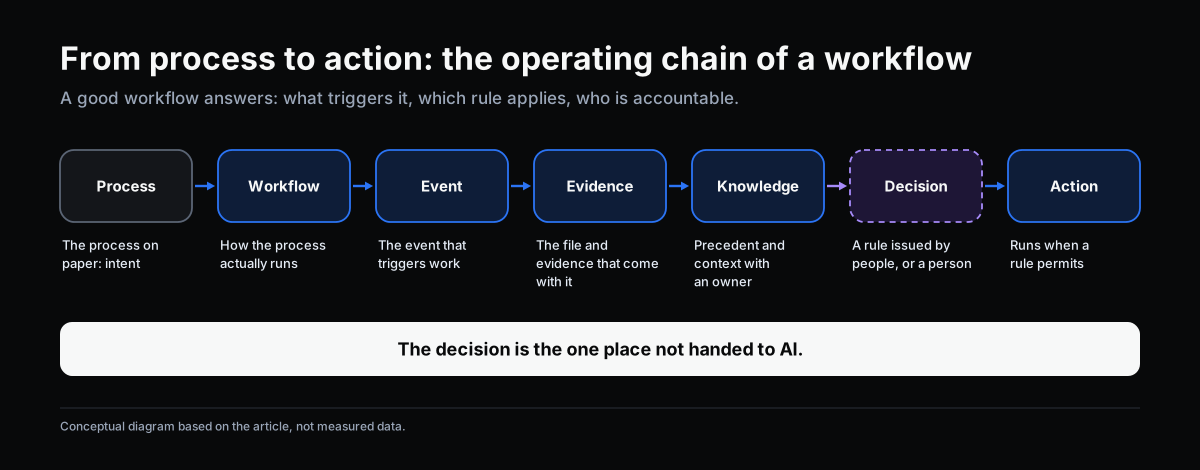
In OKELAS’s approach, a business operates through a chain:
Process → Workflow → Event → Evidence → Knowledge → Decision → Action
A workflow is how a process actually runs: which steps, who does them, in what order, on which event, based on which evidence, and who holds decision authority where. A process on paper describes intent. A workflow is what runs every day, including the parts nobody wrote down.
So a good workflow is more than a diagram. It must answer: what triggers this work, which rule applies, who is accountable, what evidence comes with it, and where does it go if no rule applies.
Part 1. Why a Workflow in Place Still Runs Slow

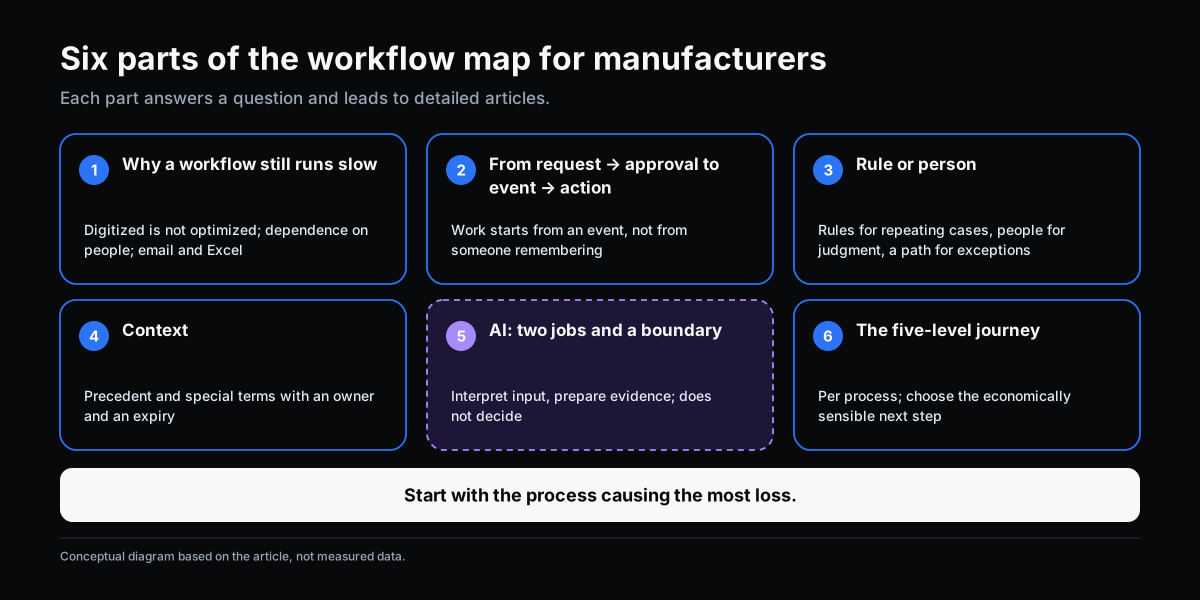
The first group of articles analyzes common reasons. Each is a different question and needs a different fix.
| Reason | What it looks like | Article |
|---|---|---|
| Digitized is not optimized | Electronic forms, but steps and approval chains unchanged from paper days | Digitized Workflow Is Not Optimized Workflow |
| Fragmented approval | Each department has its own chain; nobody sees the whole run | From Approval Workflow to End-to-End Workflow |
| Dependence on people | Rules sit in the memory of a few people | Workflow Still Depends Too Much on People |
| Shadow systems | Staff track work in email and Excel because the main system falls short | Why Staff Still Track Work in Email and Spreadsheets |
| Unnecessary waiting | Work that could run now waits for an approver | Workflow Is Already Fast: Can It Be Faster? |
| Overview | A workflow exists but work is still slow | You Have a Workflow, So Why Is Work Still Slow? |
What they share: the problem usually lies in how work is triggered, routed and decided, not in a missing tool.
Part 2. From Request → Approval to Event → Action

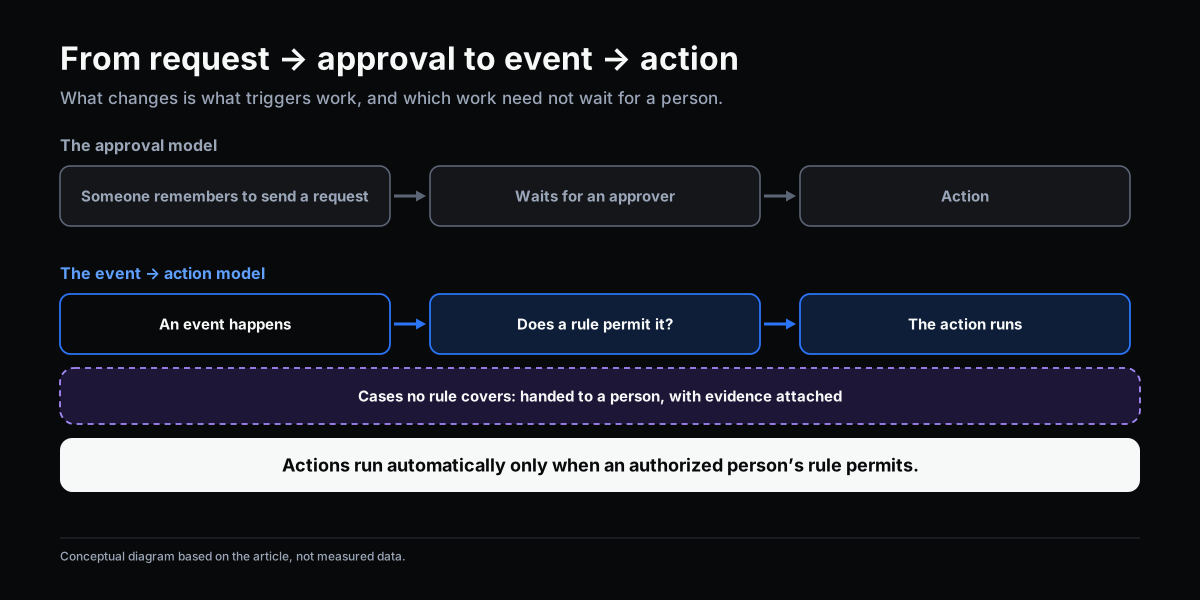
In an approval model, everything starts with a request and ends with an approval. Two consequences follow. First, work starts only when someone remembers to send the request. Second, everything waits for a person, even cases where the rule is clear and no judgment is needed.
The event → action model asks a different question: which event happened, and which rule permits which action to run? For example, a batch of raw material arriving in the warehouse is an event; if a rule issued by an authorized person says so, the action “create an incoming inspection request” can run at once without anyone sending it. Actions run automatically only when a rule permits. Cases the rule does not cover still go to a person.
Two articles go deeper:
- From Request/Approval to Event/Action: When an Action Does Not Need to Wait for Approval
- What Is Event-Driven Workflow?
Part 3. Rule or Person: Who Decides What
Not every decision should be automated. A familiar distinction in management theory, from Herbert Simon (1960), separates programmed decisions (repetitive, with clear rules) from nonprogrammed decisions (novel, ambiguous, needing judgment). Applied to workflow:
- Repeating cases with clear thresholds: a rule issued by an authorized person decides and the action runs automatically.
- Cases needing judgment: a person decides, with evidence prepared.
- Cases with no rule yet: an exception, with a clear path to whoever handles it; and if that handling becomes confirmed precedent, an authorized person can issue it as a new rule.
Rules do not change by themselves. A rule changes only when an authorized person issues it from confirmed precedent.
- Rule or Human Judgment: Which Workflow Decisions to Automate
- Handling Exceptions in Workflow: When No Rule Covers the Decision
Part 4. Context: So Special Cases Do Not Depend on Memory
Most of a factory’s “special cases” are not truly new. This customer has its own terms, that supplier has an old agreement, this batch had a similar incident. The information exists, but it sits with people.
A context-aware workflow lets rules refer to those things: confirmed precedent, special terms, the validity of earlier decisions. The condition is that context must have an owner and an expiry, otherwise it goes stale unnoticed. Context does not make AI or the system decide; it gives rules and people the right information at the right time.
Part 5. AI in Workflow: Two Jobs, and a Boundary

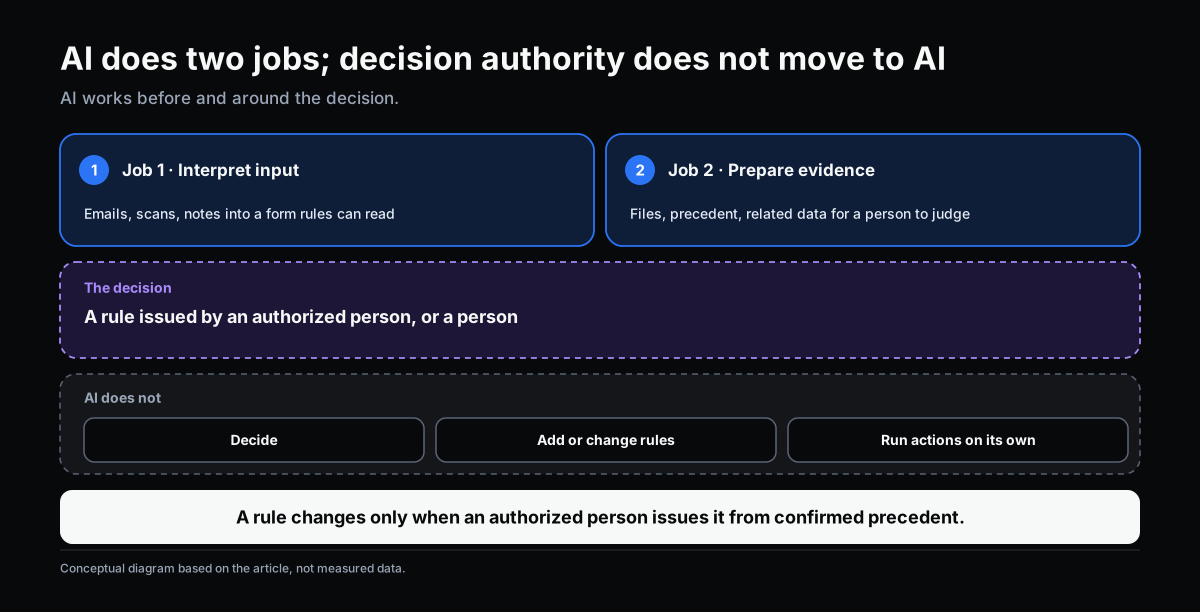
This is the part most easily misunderstood, so it should be stated plainly. AI in a workflow does two jobs:
- Interpret unstructured input (emails, scans, notes, photos) into a form rules can read, so rules can run.
- Prepare evidence (files, precedent, related data) so an authorized person can review and judge faster and better.
AI does not decide. A rule issued by an authorized person, or a person, decides. Actions run automatically only when a rule permits. From that principle, specific operational questions can be answered:
| Question | Article |
|---|---|
| What exactly does AI do in a workflow? | Where AI Fits in a Workflow |
| How do automation and AI-assisted workflow differ? | Automation and AI-Assisted Workflow |
| How does AI help classify and route without deciding the route? | Classification and Routing in Workflow |
| What makes a good AI-prepared file? | AI Prepares the Evidence, People Decide |
| Who interprets, decides, executes and records? | Separation of Duties for AI in Workflow |
| What does “delegating to AI” mean? | Delegating Workflow Steps to AI |
| Does a workflow need an AI agent? | Does Your Workflow Need an AI Agent? |
A note on agents. Anthropic’s distinction (2024) between workflows (predefined paths) and agents (the model directs its own process) shows that an agent trades predictability for flexibility. For most manufacturing workflows, rules plus AI that interprets input or prepares evidence at a simple level are enough. A narrow, read-only, bounded agent is worth considering only when evidence preparation truly depends on what each step finds. In every case, decision authority does not change.
Part 6. The Journey: Five Levels, Applied Per Process
To place yourself, you can use five levels, described by how a process actually runs:
- Manual: paper, email, memory.
- Digitized: electronic forms and approvals, processing logic unchanged.
- Rule-automated: rules issued by authorized people, exceptions have a path.
- Context-aware: rules use the organization’s precedent, relationships and validity.
- Governed AI-assisted: AI interprets input and prepares evidence, with identity, permissions and a trail.
A quick diagnostic question: if the person running this process takes a week off, what happens? The scale applies per process; a business sitting at several levels at once is normal, and not every process needs to reach level 5. Details in Where Is Your Business on the Workflow Journey?.
Common Traps
- Putting AI on a process with no clear rules. Ambiguity runs faster, not less.
- Letting AI “recommend, then approve” instead of preparing evidence. Approvers gradually follow the recommendation; the decision has moved to AI in practice without anyone issuing it.
- Context with no owner. Old precedent is still used after it has expired.
- Skipping levels. Buying AI tools before rules and exception paths exist.
- Measuring by tool count. Using the number of software products or features as the yardstick instead of handling time, share of cases handed to people, share of results corrected.
Self-Check: Eight Signs
For one critical process, tick those that are true:
- There is a workflow, but managers still have to ask directly to know where a job is.
- Staff still keep their own Excel file or chat group to track work.
- Special cases are handled correctly only when a particular person is on duty.
- Work always waits for approval even when the rule is clear.
- It is unclear who may change a rule and through what procedure.
- Approvers must gather the file themselves before deciding.
- Inputs (emails, scans) still have to be read and re-keyed by hand.
- If AI is in use, nobody can answer “what has it done in the past three months”.
If four or more are true, that is a signal to revisit how the process is designed, not only to swap tools. This threshold is OKELAS’s viewpoint to prompt discussion, not a validated measure.
Where to Start
- Pick one process causing the most loss (time, errors, compliance risk).
- Describe how it really runs, from a few recent cases, not from the process on paper.
- Identify the current level and the main bottleneck to the next.
- Choose one next step with the clearest benefit: write rules for repeating cases, set a path for exceptions, bring in context, or have AI interpret the input.
- Measure a few cycles (handling time, share of cases handed to people, share of results corrected), then expand.
Where OKELAS Fits
OKELAS is an Organization Knowledge Operating System for manufacturing SMEs. On this topic its role is foundational: managing process, workflow, event, evidence and context in one model, so rules, people and AI work on the same context. It does not replace the ERP, and does not put AI at the point of decision. If a business has no clear process, the sensible step is usually to standardize the process before considering any AI layer.
Conclusion
Workflow in a manufacturer is not slow for lack of an approval tool. It is slow when work starts only when someone remembers, rules sit in memory, special cases have no clear precedent, and approvers gather their own files. The direction is a change of design: events trigger work, rules issued by authorized people handle repeating cases, people handle cases needing judgment, context is maintained, and AI does its two jobs.
Each business starts from a different place. What matters is knowing where each process stands, and which next step is worth taking.
OKELAS’s Digitalization Readiness Assessment helps identify which level each process is at and what the next bottleneck is.
Sources
- McKinsey & Company (2025). The state of AI: How organizations are rewiring to capture value. A survey on the association between workflow redesign and bottom-line impact from generative AI; a statistical association, not proof of causation.
- Simon, H. A. (1960). The New Science of Management Decision. New York: Harper & Brothers. Distinguishes programmed from nonprogrammed decisions.
- Anthropic (2024). Building effective agents. Distinguishes predefined workflows from agents.
- Parasuraman, R., Sheridan, T. B., & Wickens, C. D. (2000). A model for types and levels of human interaction with automation. IEEE Transactions on Systems, Man, and Cybernetics – Part A, 30(3), 286–297.
The eight signs, the five levels and the principles on AI boundaries are OKELAS’s viewpoint for discussion, not measured data or an industry standard.
The Full Group of Workflow Articles
Why a workflow in place still runs slow
- You Have a Workflow, So Why Is Work Still Slow?
- Digitized Workflow Is Not Optimized Workflow
- From Approval Workflow to End-to-End Workflow
- Workflow Still Depends Too Much on People
- Why Staff Still Track Work in Email and Spreadsheets
- Workflow Is Already Fast: Can It Be Faster?
Events, rules and decisions
- What Is Event-Driven Workflow?
- From Request/Approval to Event/Action
- Rule or Human Judgment
- Handling Exceptions in Workflow
AI, context and boundaries
- Automation and AI-Assisted Workflow
- Where AI Fits in a Workflow
- Classification and Routing in Workflow
- AI Prepares the Evidence, People Decide
- When a Workflow Knows the Organization’s Context
- Separation of Duties for AI in Workflow
- Delegating Workflow Steps to AI
- Does Your Workflow Need an AI Agent?
Self-assessment
Does this describe your organization?
Does this sound familiar to your organization?