
Classification and Routing in Workflow: AI Reads the Content, Rules Decide the Route
2026-10-06
Executive Summary
- Most routing today runs on keyword rules: a subject containing “refund” goes to customer care. This pattern, the Content-Based Router, was described by Hohpe and Woolf in Enterprise Integration Patterns (2003). It is fast and easy to audit, but it is only right when people phrase things the way the rule expects.
- Classification and routing are two different jobs. Classification is understanding: what kind of request is this. Routing is a decision: where does this kind go. AI can help with the first. The second stays with a rule issued by an authorized person, or with a person.
- A sound design: AI proposes a type with a confidence level and the passage it relied on; a routing table issued by an authorized person decides where it goes; uncertain or multi-issue cases go to a triager instead of being forced into one category.
- The biggest value is not faster classification but fewer times a request is read and handed off before it reaches the right person, while still knowing who is accountable for each route.
Introduction
A customer writes: “I paid but I still can’t log in.” The routing rule looks for “refund” and “invoice”, finds neither, and the request lands in a shared inbox. A clerk reads it, sees an activation failure after payment, and forwards it to engineering. Engineering reads it again, sees it needs a transaction check, and forwards it to accounting. Three reads, three hand-offs, and no one in the chain was wrong.
The familiar proposal is to let AI “classify and route on its own.” That is half right. AI can read free-form text. But choosing a route is a consequential decision, and “who answers when the route is wrong” needs an answer before choosing technology. This article separates the two jobs.
(This is an illustrative scenario, not a specific customer’s case.)
Keyword Rules: Strengths and Limits

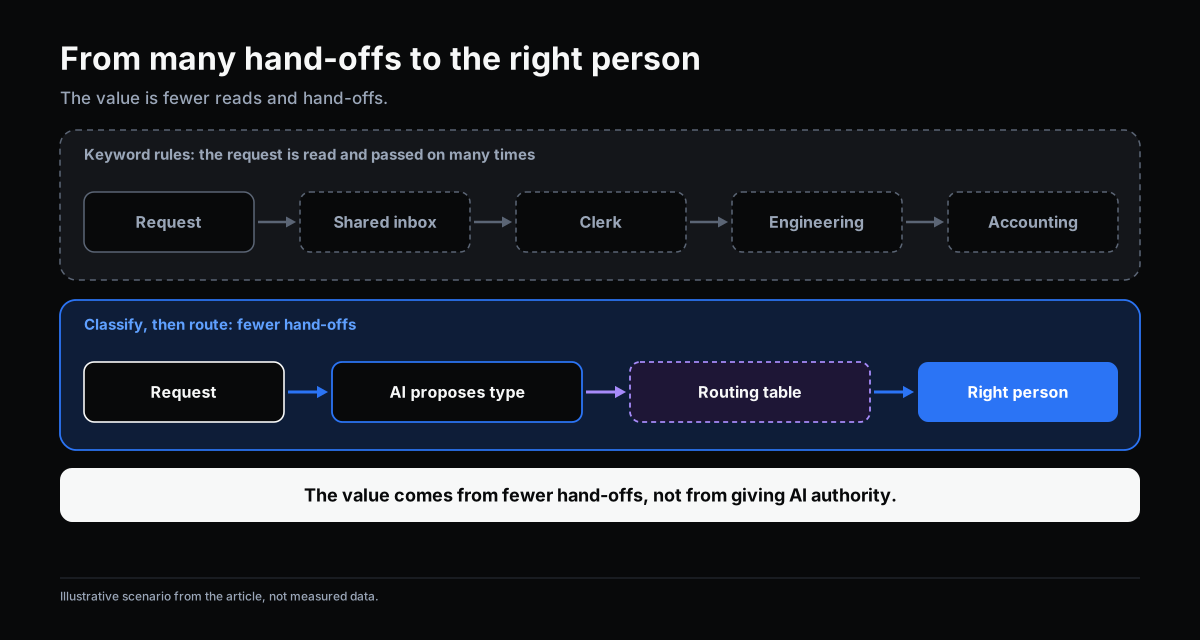
The Content-Based Router, in Hohpe and Woolf’s (2003) account, sends a message to its destination based on its content, using criteria set in advance. Its strengths are plain: fast, easy to understand, easy to audit, and each rule has a named owner.
The limit comes from the nature of a rule: it is right only when the content matches what was anticipated. In practice:
- One problem, many phrasings. “Can’t log in after paying” and “I want my money back” may need the same handling, yet share no keyword.
- One request, several issues. The rule must pick one criterion, and the pick is partly arbitrary.
- Language drifts. New products and new internal terms make rules stale unless someone updates them.
Rules do not fail randomly. They fail systematically: right for the anticipated script, wrong for every other variant. Maintaining the rule set becomes continuous work, always behind reality.
Separating the Two Jobs: Classify, Then Route

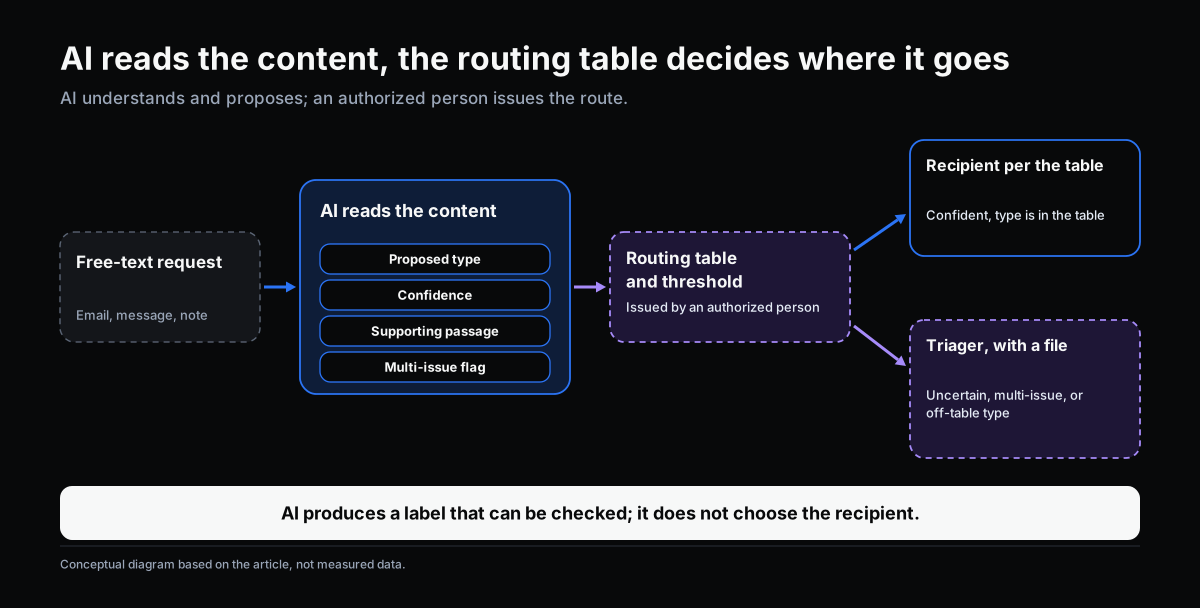
The natural fix is to let AI read the content instead of matching keywords. That works, provided the boundary set out in Where AI Fits in a Workflow holds: AI interprets input so rules can run, and prepares evidence so people can judge.
Applied to routing, the two jobs sit on separate layers:
| Layer | Job | Who | Holds decision authority? |
|---|---|---|---|
| Understand | Read content, propose a request type, state confidence and the passage relied on | AI | No |
| Route | For type X, send to whom, within what time | Routing table issued by an authorized person | Yes, within the table |
| Exception | Uncertain cases, multi-issue cases, or types not in the table | A triager, with a file | Yes |
The difference from “AI routes on its own”: AI does not choose the recipient. It produces a label that can be checked. The label feeds a routing table, and the table is the thing that has an owner, a version and can be reviewed.
How AI Reads Content, and What It Returns
Instead of searching for a keyword, AI reads the whole text to identify the intent, whatever words express it. For the request in the introduction, it can recognize that the post-payment login failure belongs with refund requests, though the two sentences share no word.
The output is useful when it has four parts:
- A proposed type, drawn from a category list the organization has defined, not a label AI invents.
- A confidence level, so the rule knows when to stop.
- The supporting passage, so a reviewer sees what AI relied on.
- A multi-issue flag, when the request contains more than one matter, so it can be split rather than forced into one.
AI can still misclassify, especially on truly ambiguous or unseen requests. The difference is not that it never errs, but that its errors are contained: a wrong label only has effect where the routing table allows, and the table can be designed to stop at uncertain cases.
The Routing Table and Thresholds: What People Issue

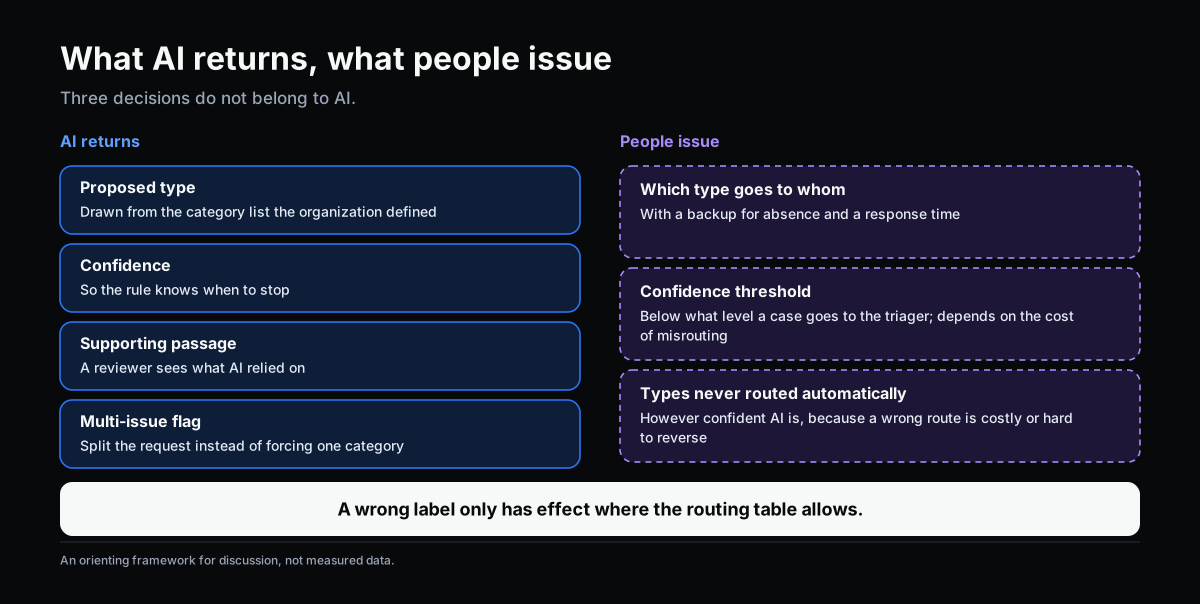
Three decisions do not belong to AI. They belong to an authorized person and should be recorded as a rule:
- Which type goes to whom, with a backup for absence and a response time.
- The confidence threshold: below what level a case goes to the triager instead of straight down the table. There is no universal threshold; it depends on the cost of misrouting in the specific process.
- Which types are never routed automatically, however confident AI is, because a wrong route is costly or hard to reverse.
This is the same logic as exception handling in workflow: a case outside what rules allow to run on their own must reach a specific person, with a file, and the decision must be recorded.
Suggesting the Next Step: Keep It at the Level of a File, Not a Decision

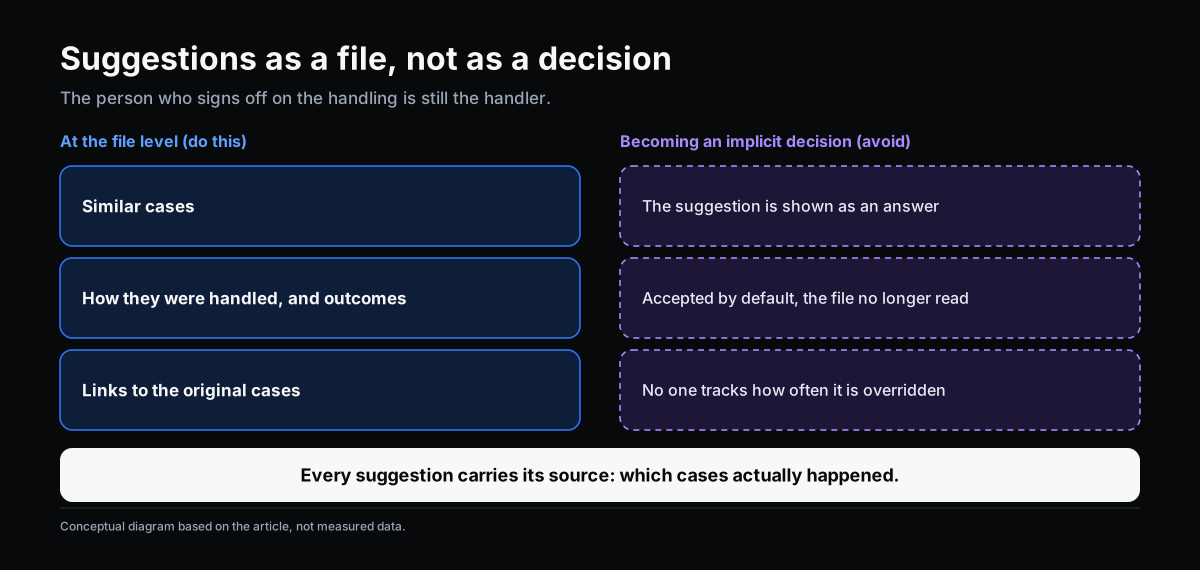
After classification, people often want the system to suggest the handling too. At the level of a file this is useful: when a new request resembles handled cases, the system can present similar cases, how they were handled and the outcomes, with links to the originals. The handler starts from context rather than from scratch, which is exactly what “preparing evidence” means.
What to avoid is a suggestion turning into an implicit decision. Three signs it is happening:
- the suggestion is shown as an answer rather than as precedent to consult;
- handlers accept the default and stop reading the file;
- no one tracks how often suggestions are overridden.
A simple principle: every suggestion carries its source, meaning which cases actually happened, and the person who signs off on the handling is still the handler.
Four Situations
These examples illustrate the layering; they are not results measured at a specific company.
Customer complaints. AI proposes a group (quality, delivery, payment) and quotes the supporting passage. The routing table sends it to the matching team. A complaint mentioning safety or legal matters always goes to a designated person, whatever the confidence.
Internal support requests. A request from production may involve IT, maintenance, or both. AI flags multiple issues, and a triager decides whether to split it into two requests or keep one.
Supplier emails. Order confirmations, late-delivery notices and price-change requests need three different people. AI reads the free-form email to propose a type; the rule routes by the table; a price-change email goes to the person with authority over pricing.
Equipment incident reports. An operator describes symptoms in free text (“strange noise, running slower than usual”). AI presents similar past incidents as a file for the technician. The technician still concludes the fault type.
How to Tell It Is Working
Average accuracy alone is not enough. Track three things by sampling regularly in your own process:
- Misroute rate: cases that must be re-routed after reaching a recipient.
- Hand-offs per request: how many times a request is read and passed on before reaching the right person, compared with before AI.
- Share of cases stopped at the confidence threshold, and the time the triager takes on them.
What counts as acceptable depends on the cost of misrouting in each process. Set the baseline from your own data, before and after introducing AI.
Self-Check
- Does your routing table have an owner and a version, or is it a collection of habits among whoever reads the inbox?
- When a request matches no rule, where does it go, and who is accountable for it?
- How are multi-issue requests handled today: forced into one category, or split?
- Are there request types where a wrong route is costly enough that automatic routing should not apply?
- If AI misclassifies, do you have a way to catch it early by sampling, or only when a customer complains?
- Are handling suggestions shown as precedent to consult, or as an answer?
If three or more make you hesitate, clarify the routing table and the exception path before putting AI into classification.
Conclusion
Keyword rules are not wrong; they have a natural limit when real language does not match what was anticipated. AI upgrades the “understanding” step in front of routing, from keyword matching to intent recognition. But choosing a route is still a decision, and that decision stays with a routing table issued by an authorized person, or with a triager when a case is uncertain.
Classification and routing are among the lower-risk places to start with AI in a workflow precisely because the boundary is clear: AI reads, a rule routes, the handler decides. The value comes from requests reaching the right person after fewer hand-offs, not from giving AI authority.
OKELAS’s Digitalization Readiness Assessment helps identify which of your processes already have enough rules and data to start here.
Sources
- Hohpe, G., & Woolf, B. (2003). Enterprise Integration Patterns: Designing, Building, and Deploying Messaging Solutions. Addison-Wesley. (Content-Based Router)
- Parasuraman, R., Sheridan, T. B., & Wickens, C. D. (2000). A model for types and levels of human interaction with automation. IEEE Transactions on Systems, Man, and Cybernetics – Part A, 30(3), 286–297.
Related Articles
- Where AI Fits in a Workflow: Interpreting Input and Preparing Evidence
- Automation and AI-Assisted Workflow: Two Different Jobs
- Handling Exceptions in Workflow: When No Rule Covers the Decision
- Rule or Human Judgment: Which Workflow Decisions to Automate
Does this describe your organization?
Does this sound familiar to your organization?