
Automation and AI-Assisted Workflow: Two Different Jobs, Not Two Rungs of a Ladder
2026-10-06
Executive Summary
- “We already have automation, should we add AI?” is often read as a ladder: automation below, AI above, and AI “smarter”. That reading leads to investment in the wrong place.
- Automation and AI support do two different jobs. Automation executes actions under rules issued by authorized people. AI support reads unstructured input so rules can run, and prepares evidence so people can judge faster and on firmer ground.
- Decision authority does not sit with AI. It sits with rules (issued by people) or with people. So AI does not “handle exceptions” for people; it helps exceptions reach the right person with a complete file.
- A sensible investment order follows dependency: standardize the process and write rules, automate the repeating part, build an exception path, then add AI support where input or case files are a genuine bottleneck.
Introduction
A company has put robots (RPA) into purchasing. The robots run well on standard orders. But every day a group of orders stops them: a supplier’s confirmation in free-text email, an unusually written part number, a change request inside a photo. The manager sees an obvious fix: “add AI so the robot understands and handles these itself.”
The proposal sounds reasonable, but it merges two different jobs. Reading the email is one job. Deciding what to do when the email conflicts with a rule is another, and someone must answer for it. This article separates the two so you can invest in the right place.
(This is an illustrative scenario, not a specific customer’s case.)
What Automation Does Well

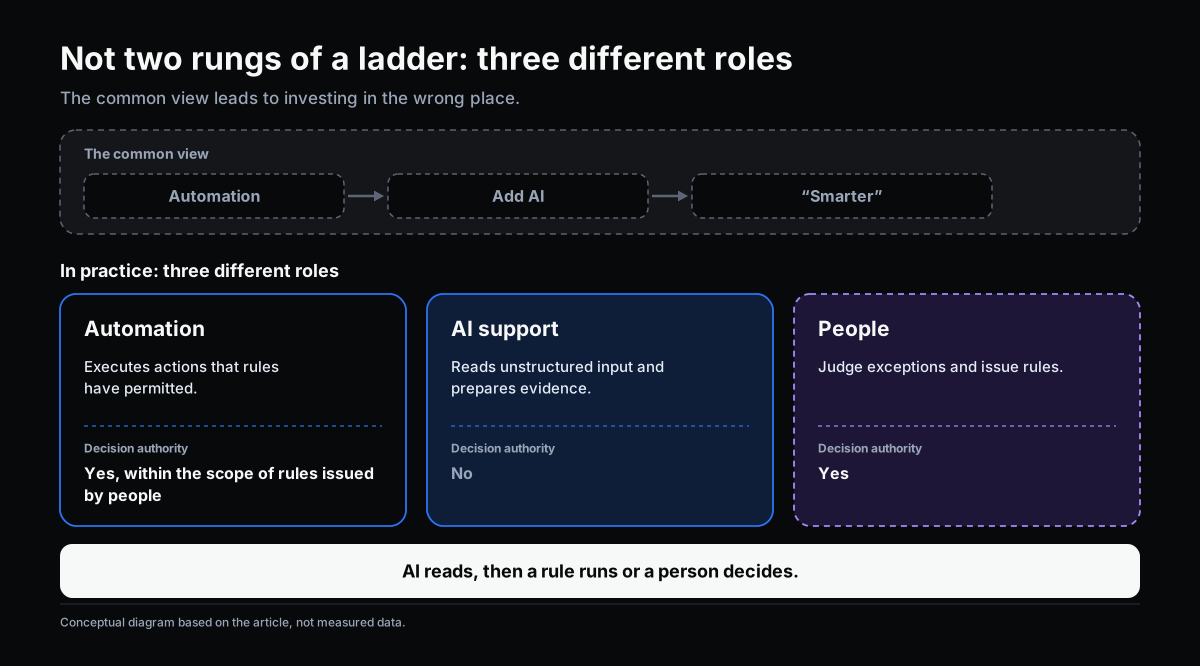
Automation, including RPA (Robotic Process Automation), carries out repeated actions under clearly written rules: if condition A, do B. It fits when three conditions hold together:
- the criteria are clear and written down;
- the input is structured (form fields, spreadsheet columns);
- a wrong run has acceptable consequences, or can be corrected.
Its value is steady operation regardless of who is busy, and fewer data-entry errors. One point to keep in mind: automation does not decide on its own. Every rule is a decision an authorized person made in advance, as described in From Request/Approval to Event/Action. Good automation has a named owner for each rule.
Where Automation Stops

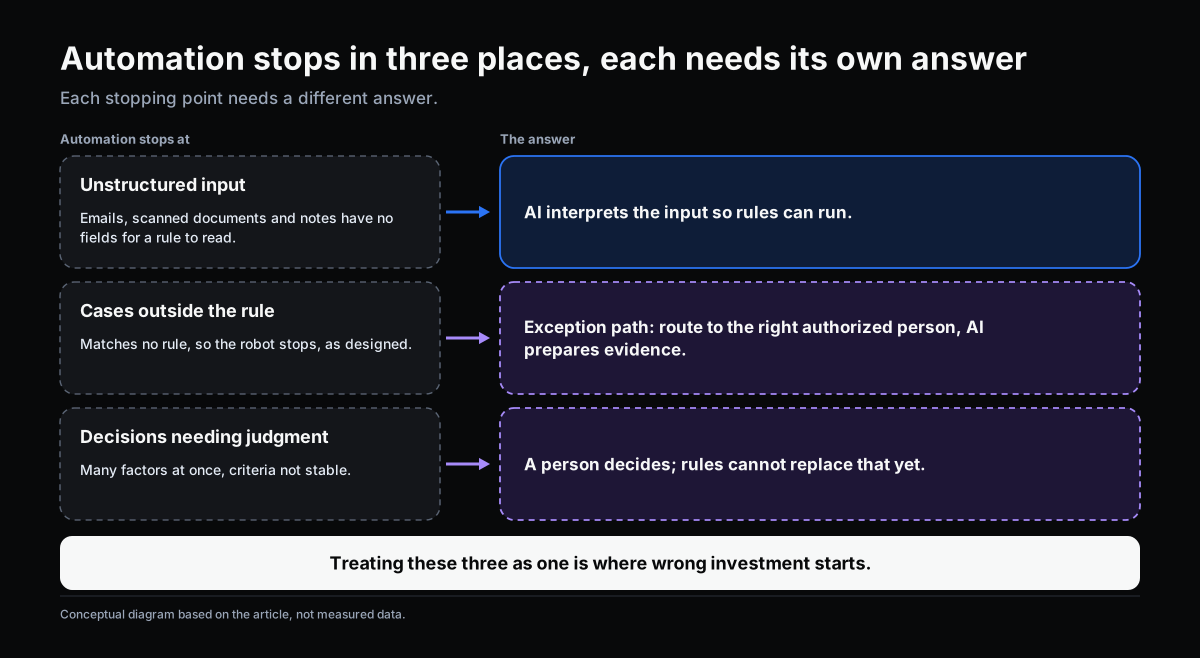
Automation stops in three places, and each needs a different answer.
1. Unstructured input. Emails, messages, scanned documents and handwritten notes have no fields for a rule to read. This is most of the information in many real processes, and it is where robots usually stop first.
2. Cases outside the rule. When a situation matches no rule, the robot stops and waits for a person. That is correct behavior, not a bug. What needs designing is where the case goes after the robot stops. For more, see Handling Exceptions in Workflow: When No Rule Covers the Decision.
3. Decisions that need judgment. When several factors must be weighed together and criteria are not stable, this is a nonprogrammed decision in Herbert Simon’s (1960) sense. Rules cannot yet replace people here.
The term “hyperautomation,” which Gartner included in its strategic technology trends published in 2019, reflects the industry’s view that a single automation tool rarely covers a whole process, so several technologies need to be combined. What Gartner does not say, and what this article stresses, is that combining more technology does not move decision authority to the technology.
What AI Support Adds, and What It Does Not

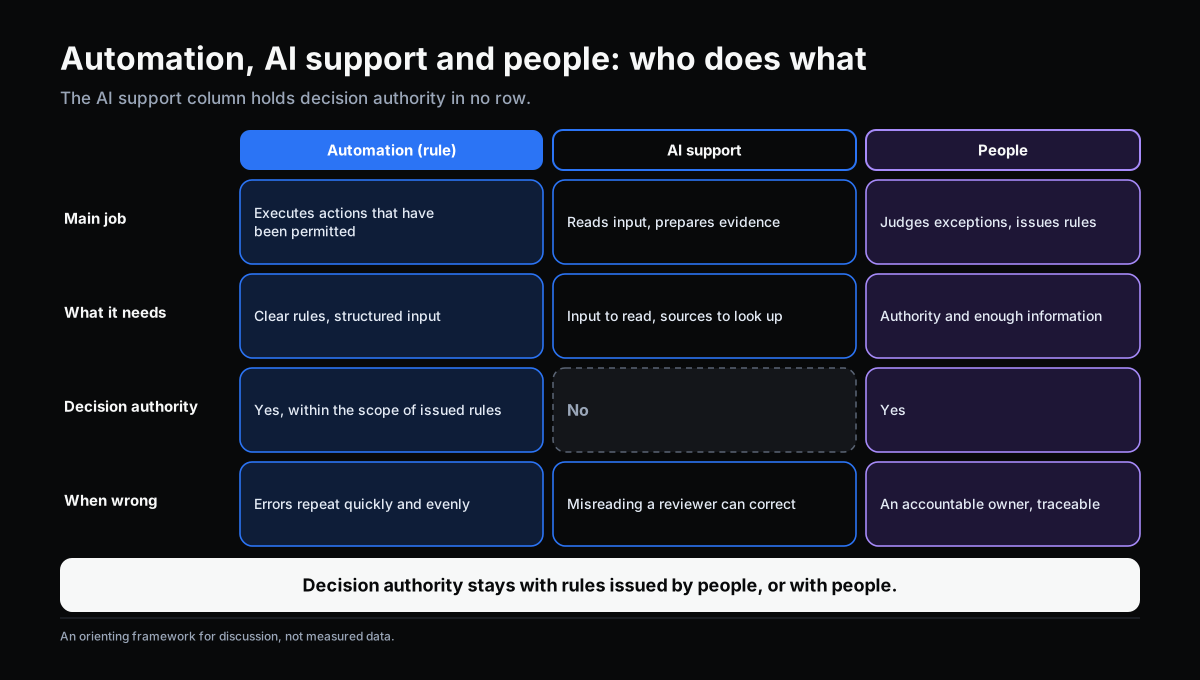
The three stopping points do not share one answer. AI support addresses the first and helps with the second and third, through the two jobs set out in Where AI Fits in a Workflow:
- Interpret unstructured input so rules can run: read emails, extract figures, assign a request type.
- Prepare evidence so people can judge faster: find similar cases, pull together relevant clauses and data, and point to sources.
The table below is a discussion framework, not measured data.
| Automation (rule) | AI support | People | |
|---|---|---|---|
| Main job | Executes actions that have been permitted | Reads input, prepares evidence | Judges exceptions; issues rules |
| What it needs | Clear rules, structured input | Input to read, sources to look up | Authority and enough information |
| Decision authority | Yes, within the scope of issued rules | No | Yes |
| When wrong | Errors repeat quickly and evenly | Misinterpretation that a reviewer can correct | A wrong call has an accountable owner and a trace |
The most important point in the table: the AI support column holds decision authority in no row. That is why “AI handles exceptions itself” is a misleading phrase. The right order is: AI reads, then a rule runs or a person decides.
Three Common Investment Mistakes
Adding AI when the problem is that rules are unwritten. If handling criteria live in a few people’s heads, AI reading emails faster changes nothing: each person will still decide differently afterward. Write the criteria and standardize the process first.
Building automation for an exception-heavy process with no exception path. Robots stop constantly, people resolve cases through chat or email, and automation becomes a thin layer over the old way of working.
Expecting AI to “handle exceptions itself”. This hands a decision to a party nobody answers for. When something goes wrong no one is accountable, and the organization has no evidence to learn from. Exceptions need an authorized person, with a file AI helped prepare.
Where to Start

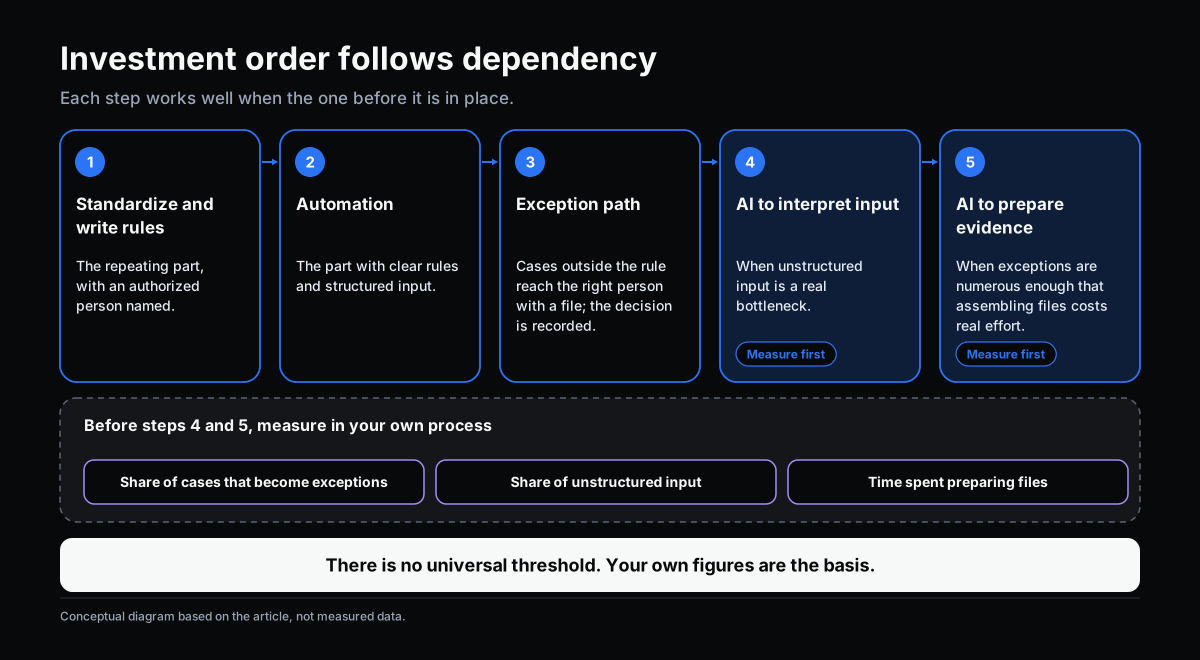
This is not a ladder from low to high. It is an order of dependency: each step works well when the one before it is in place.
- Standardize the process and write rules for the repeating part, with an authorized person’s name on each.
- Automate the part with clear rules and structured input.
- Build the exception path: cases outside the rule reach the right person with a file, and the decision is recorded.
- AI to interpret input where unstructured input is a real bottleneck.
- AI to prepare evidence when exceptions are numerous enough that finding and assembling files costs real effort.
Before deciding on steps 4 and 5, measure three things in your own process: the share of cases that become exceptions, the share of input that is unstructured, and the time people spend preparing files for exception cases. There is no universal threshold. Your own figures are the basis.
Self-Check: Which Job Are You Investing In?
- Are the process’s rules written down with a named owner, or do they live in a few heads?
- When a robot stops, do you know where that case goes and who decides?
- Is most of the process’s input structured, or is it emails, images and notes?
- Does any proposal expect AI to “decide” at a step where you cannot name who is accountable?
- Have you measured the exception rate and the time spent preparing files, or are you deciding by feel?
If three or more make you hesitate, clarify the rules and the exception path before choosing technology. OKELAS’s Digitalization Level Assessment helps place these decisions in the wider picture of your digitalization.
Conclusion
Automation and AI support are not two rungs of one ladder, and certainly not competitors. Automation executes what rules permit. AI reads what rules cannot read and prepares files so people can decide. Decision authority stays with rules issued by authorized people, or with people themselves.
Confusing the two usually leads to one of two mistakes: investing AI where rules are needed, or expecting automation to do the work of someone who must judge. Asking “which part needs whom” before asking “which technology” tends to cost less.
Sources
- Gartner (2019). Top 10 Strategic Technology Trends for 2020 (introduced the term hyperautomation).
- Parasuraman, R., Sheridan, T. B., & Wickens, C. D. (2000). A model for types and levels of human interaction with automation. IEEE Transactions on Systems, Man, and Cybernetics – Part A, 30(3), 286–297.
- Simon, H. A. (1960). The New Science of Management Decision. Harper & Brothers.
Related Articles
- Where AI Fits in a Workflow: Interpreting Input and Preparing Evidence
- Handling Exceptions in Workflow: When No Rule Covers the Decision
- Rule or Human Judgment: Which Workflow Decisions to Automate
- From Request/Approval to Event/Action: When an Action Does Not Need to Wait for Approval
Does this describe your organization?
Does this sound familiar to your organization?