
Handling Exceptions in Workflow: When No Rule Covers the Decision
2026-10-06
Executive Summary
- Every rule set has a part it does not reach. A case outside the rule is an exception, and exceptions happen more often than organizations admit. The important question is not “how do we avoid exceptions” but where an exception goes when it happens.
- The common approach is a side-channel: a chat message, an email, a phone call, or simply letting it through. The decision still gets made, but no evidence is left, so nobody learns from it.
- A designed exception path has five parts: detect, route to the right authorized person, prepare evidence, a person decides and records the reason, then build precedent.
- AI helps with preparation (interpreting input, finding similar cases). Judging the exception belongs to people. An exception becomes a rule only when an authorized person reviews and issues it.
Introduction
A long-standing customer places a rush order with a small change to a specification. The process has no path for this case. The planning manager messages the QC manager on a chat app. QC replies, “fine, let this batch through.” The order ships on time. Six months later the customer complains, or an auditor asks why that batch was accepted. The chat has scrolled away, the decision-maker has moved to another team, and nobody remembers the reason.
(This is an illustrative scenario, not a specific customer’s case.)
The decision may have been entirely right. The problem is that it never belonged to the organization. It lived in a chat thread and in two people’s memories. This article looks at why exceptions are where operational knowledge is most easily lost, and how to design a handling path that turns them into an asset instead of a risk.
Exceptions Are Part of Operations, Not Mistakes
Research on office work, going back decades, has shown that written procedures are a reference, not a full description of how work is done. Suchman (1983) described procedures as a resource that people interpret in context. Strong and Miller (1995) analyzed exceptions in computerized information processes and showed that exceptions are a permanent feature that needs deliberate management.
Through Herbert Simon’s (1960) lens, an exception is a nonprogrammed decision appearing inside a process designed for programmed ones: new, without clear criteria, needing judgment. For the continuum itself, see Rule or Human Judgment: Which Workflow Decisions to Automate.
The consequence: a mature workflow is not one without exceptions. It is one that knows where exceptions go.
Three Common Ways Exceptions Get Handled, and Their Cost

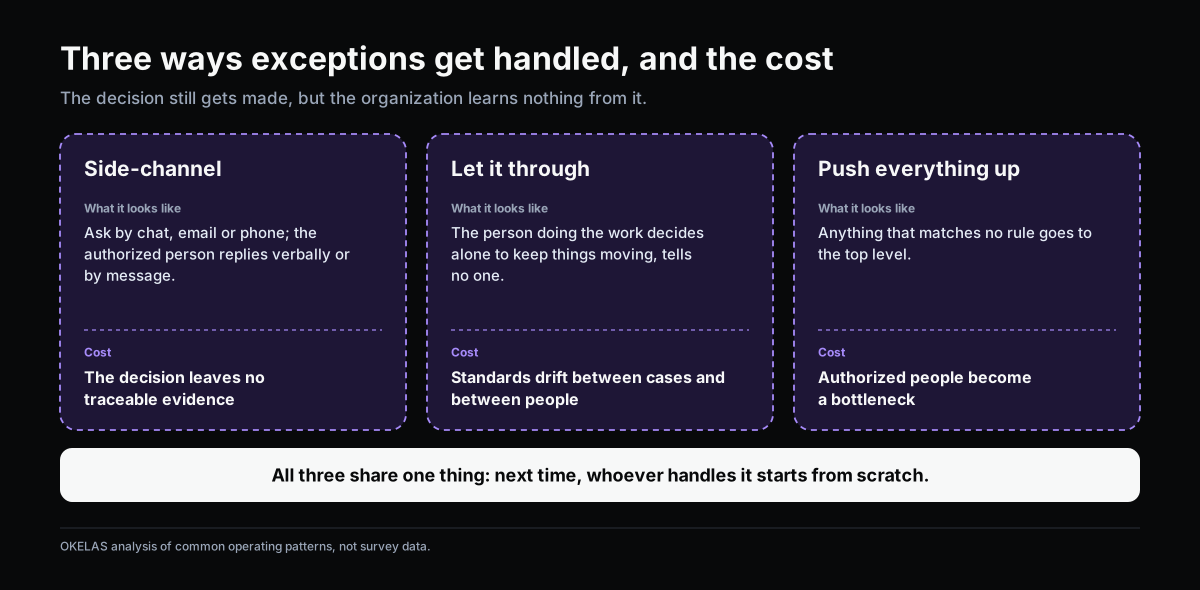
The table below is OKELAS’s analysis of common operating patterns, not survey data.
| Approach | What it looks like | Cost |
|---|---|---|
| Side-channel | Ask by chat, email or phone; the authorized person replies verbally or by message | The decision leaves no traceable evidence; those who come later do not know the reason |
| Let it through | The person doing the work decides alone to keep things moving, tells no one | Standards drift between cases and between people; risk piles on whoever did the work |
| Push everything up | Anything that does not match a rule goes to the top level | Authorized people become a bottleneck; simple and hard cases wait the same |
All three share one feature: the decision is still made, but the organization learns nothing from it. The next time the same situation appears, whoever handles it starts from scratch, and may decide differently.
A Designed Exception Path

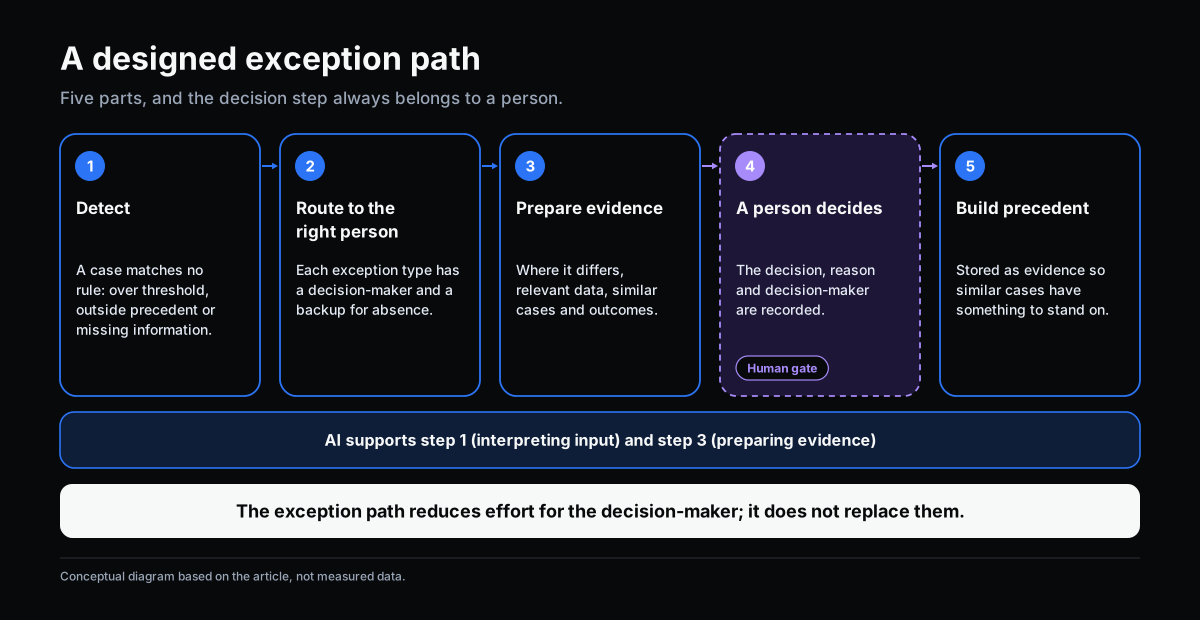
Instead of letting exceptions find their own way, a workflow can have a dedicated path with five parts.
1. Detect. The system recognizes a case that matches no rule: it exceeds a threshold, falls outside confirmed precedent, or lacks information needed to apply a rule. Detection rests on written conditions, not on someone remembering.
2. Route to the right authorized person. Each kind of exception has a designated decision-maker, with a named backup for absence. Not every exception goes to the top level.
3. Prepare evidence. The decision-maker receives a compact file: where this case differs from the rule, relevant data, similar past cases and what happened. The goal is to judge faster and on firmer ground.
4. A person decides and records the reason. The authorized person decides. The system records the decision, the reason and who made it as part of the case file.
5. Build precedent. The decision is stored as traceable evidence, so similar cases later have something to stand on.
The key point: step 4 is neither skipped nor automated. The exception path reduces the effort for the decision-maker. It does not replace them.
What to Record When Handling an Exception

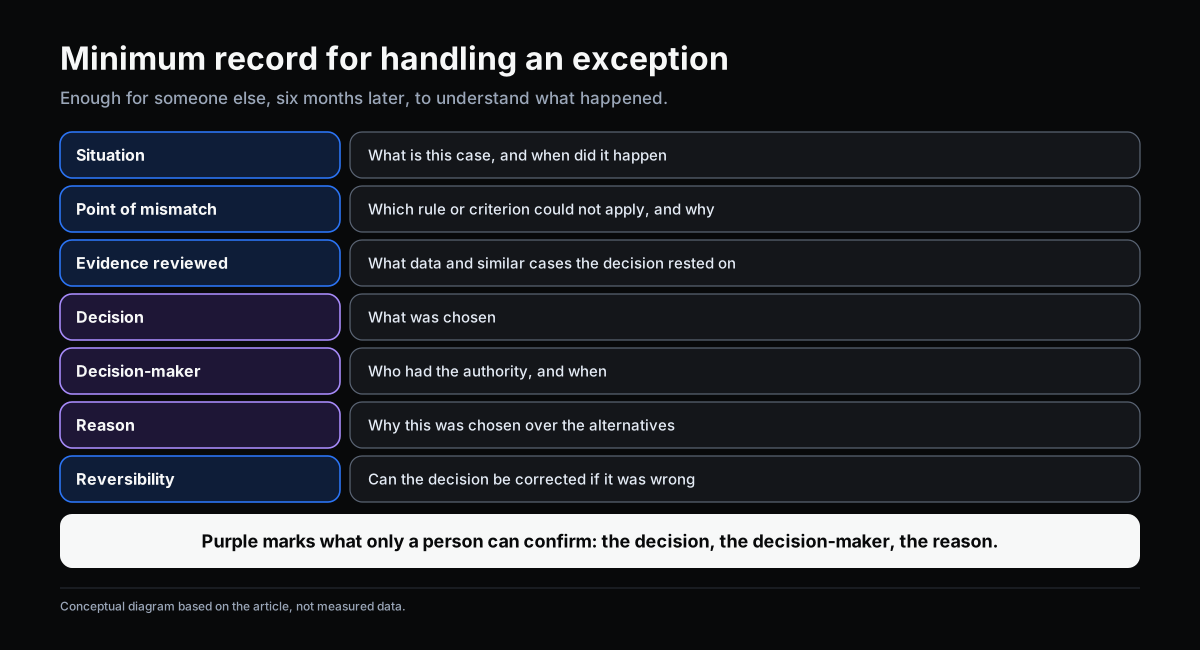
An exception record does not need to be long. The minimum set below is enough for someone else, six months later, to understand what happened.
| Record | The question it answers |
|---|---|
| Situation | What is this case, and when did it happen |
| Point of mismatch | Which rule or criterion could not apply, and why |
| Evidence reviewed | What data and similar cases the decision rested on |
| Decision | What was chosen |
| Decision-maker | Who had the authority, and when |
| Reason | Why this was chosen over the alternatives |
| Reversibility | Can the decision be corrected if it was wrong |
In the opening example, had the decision to let the batch through gone down this path, the auditor’s question six months later would have an answer in the file, not in someone’s memory.
From Exception to Rule: When and How

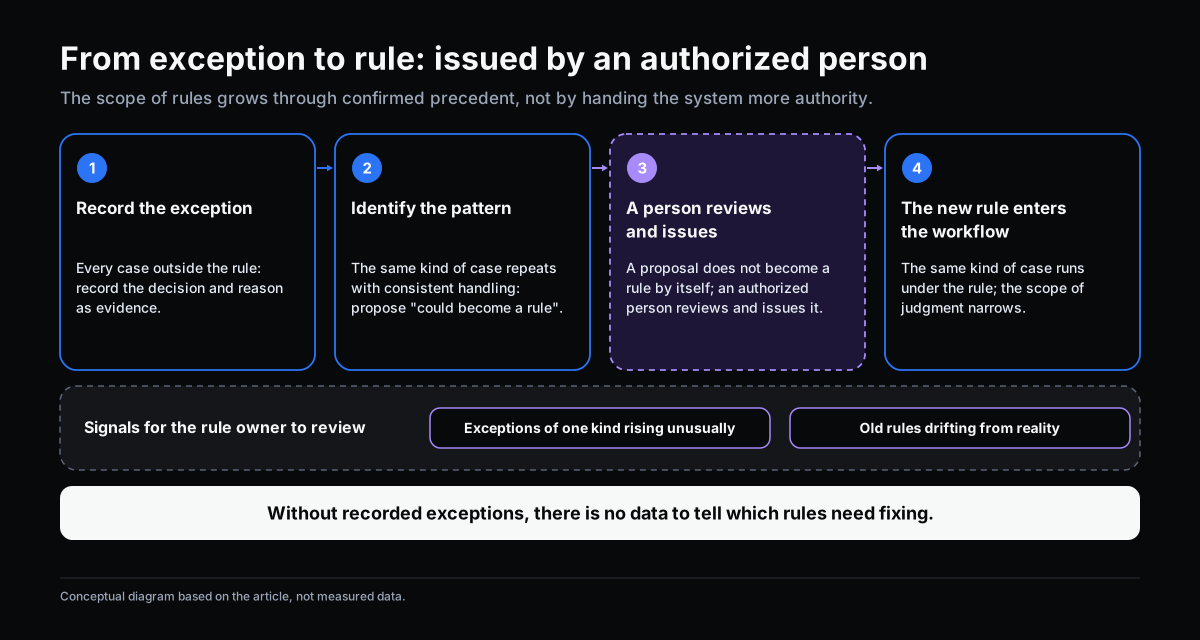
An exception that repeats with a consistent handling is a signal that a decision is drifting toward the programmable end. The right mechanism, as the article on rules and human judgment describes, has four steps: record the exception, identify the pattern, a person reviews and issues, and then the new rule enters the workflow.
Two points matter:
- A proposal that “this could become a rule” does not become one by itself. An authorized person reviews, edits and issues it. The scope handled by rules grows through confirmed precedent, not by handing the system more authority.
- The number of exceptions is itself a signal. When exceptions of one kind rise unusually, the current rule may be out of date. That is a matter for the rule owner during periodic review.
The reverse also holds: if exceptions are not recorded, the organization has no data to tell which rules need fixing. Old rules keep accumulating while reality has moved on.
The Role of AI in the Exception Path
AI helps in two places, matching the two jobs set out in Where AI Fits in a Workflow.
- Interpreting input. Exceptions often arrive unstructured: a complaint email, a message, a scanned document. AI reads it and converts it to structured information so the system can recognize the case and route it to the right person.
- Preparing evidence. AI finds similar cases, pulls together relevant clauses and data, and points to the source so the decision-maker can verify.
AI does not decide the exception, does not mark a case as “accepted,” and does not turn an exception into a rule on its own. The reason is more than principle: exceptions are exactly the decisions whose criteria are unclear, so someone with authority must answer for the result.
Common Mistakes When Designing an Exception Path
- Treating exceptions as errors to reduce to zero. A reasonable goal is exceptions handled with control, not no exceptions.
- Not naming a decision-maker by case type. Everything lands in one shared inbox and becomes a bottleneck.
- Recording too much. A long form makes people skip it and drift back to side-channels. The minimum set above is enough to start.
- Dropping the step where a person issues the rule. Automating the conversion of exceptions into rules removes what makes a rule trustworthy: someone’s name on it.
Self-Check: Where Do Exceptions Go in Your Organization?
Pick one important process and answer:
- When a case matches no rule, does the person doing the work know exactly who to hand it to?
- For the last 5 exceptions, can you find the decision, the decision-maker and the reason, or would you have to ask around?
- Is any decision living mainly in a chat app, a personal inbox or one person’s memory?
- For the same kind of situation, would two different people make two different decisions?
- When the person responsible is out for a week, where do exceptions go?
- Does anyone own reviewing repeated exceptions to propose new rules?
If three or more make you hesitate, the knowledge of how exceptions get resolved sits outside the organization. OKELAS’s Knowledge Management Maturity Assessment helps you see how well your operational knowledge is being captured.
Conclusion
Exceptions are not something to hide or reduce to zero. They are where a company meets situations its rules did not anticipate, and where operational knowledge is actually created. A company that handles exceptions through chat still makes good decisions, but that knowledge leaves with the person who decided.
A designed exception path does three things: it routes the case to the right person, helps them decide on a basis, and keeps the decision as evidence. People still judge. What changes is that the judgment no longer disappears.
Sources
- Suchman, L. (1983). Office procedure as practical action: models of work and system design. ACM Transactions on Office Information Systems, 1(4), 320–328.
- Strong, D. M., & Miller, S. M. (1995). Exceptions and exception handling in computerized information processes. ACM Transactions on Information Systems, 13(2), 206–233.
- Simon, H. A. (1960). The New Science of Management Decision. Harper & Brothers.
Related Articles
- Rule or Human Judgment: Which Workflow Decisions to Automate
- From Request/Approval to Event/Action: When an Action Does Not Need to Wait for Approval
- Where AI Fits in a Workflow: Interpreting Input and Preparing Evidence
Does this describe your organization?
Does this sound familiar to your organization?