
Does Your Workflow Need an AI Agent? Five Levels of AI Use and Four Questions to Pick the Right One
2026-10-07
Executive Summary for COO/CIO
- “Workflow” and “agent” are two different ways of organizing work. In a workflow, steps and paths are defined in advance. In an agent, the AI model decides what to do next and which tools to use. Agents are more flexible; in return, they are harder to predict, harder to test, and more expensive.
- In OKELAS’s approach, AI does only two things: interpret unstructured input so rules can run, and prepare evidence for people to judge. The question “do we need an agent?” is therefore not a question about who decides. Decision authority stays with rules issued by authorized people or with people — whether or not an agent is used.
- AI use in a workflow can be seen across five levels, from rules only to a fully autonomous agent. You should choose the lowest level that solves the problem, and only move to a higher level when there is a specific reason.
- Four questions to choose the right level: can the steps be written in advance; where is the bottleneck caused by unstructured input; does evidence preparation require traversing sources that vary case by case; and if something goes wrong, what are the consequences — is it traceable and reversible?
- For most workflows in small and mid-sized manufacturing companies, levels 1 and 2 are enough. Level 3, a narrow agent preparing evidence, is worthwhile for only a few tasks — and must be tightly bounded.
Introduction
A COO at a mid-sized manufacturer has been hearing a lot about “agentic AI” at conferences. He asks the IT team: “Should we replace our order-processing workflow with an AI agent?”
The question sounds reasonable, but it lumps three distinct problems into one. An order-processing workflow has a step to check inventory, a step to approve credit limits, a step to confirm with the customer. These steps are clear and repeat every day. The real source of delay is somewhere else: orders arrive as emails, scans and messages, and someone has to read and re-enter each one. On top of that, when an order is held for exceeding a credit limit, the approver spends time gathering payment history and previous orders before making a decision.
These three problems need three different levels of AI — and none of them actually need an agent that decides its own path. (This is an illustrative scenario, not a specific customer’s case.)
Where Workflow and Agent Differ
The most useful current distinction comes from the AI systems-building community. Anthropic, in Building Effective Agents (2024), divides systems that use language models into two types: workflows, where models and tools are orchestrated along paths defined in code; and agents, where the model directs its own process and how it uses tools. The accompanying recommendation is worth noting: start with the simplest solution, and only increase complexity when genuinely needed.
For a business, that distinction has concrete consequences:
- In a predefined workflow, you know in advance which steps will run. Testing, auditing and explaining are all easier.
- In an agent, the number of steps, their order and the data sources are chosen at runtime. Two runs with the same input may take different paths.
- This flexibility has value when you do not know in advance what needs to be done. But it also means each run must be logged more thoroughly to be explainable.
To be clear: “workflow” here is a term from the AI systems-building world. In this article, a workflow is a business’s chain of operating steps, and the question is at what level AI should participate in that chain.
Regardless of Level, Decision Authority Does Not Change
Before discussing the levels, one foundational principle needs to hold: AI in a workflow does two things, and only two things.
- Interpreting unstructured input (emails, scans, notes, images) into a form rules can read.
- Preparing evidence for an authorized person to review and judge.
Decisions belong to rules issued by authorized people, or to people. Actions run automatically only when a rule permits them. Rules change only when an authorized person issues a new one from a confirmed precedent. This principle was set out in Where AI Fits in a Workflow and Separation of Duties for AI in Workflow.
What this means for this article: an agent, if used, is only a way of organizing the work of interpreting and preparing evidence. It is not granted additional decision authority because it is “more autonomous.” What an agent changes is the degree of variance in how the work is done — not who is accountable for the outcome.
Five Levels of AI Use in a Workflow

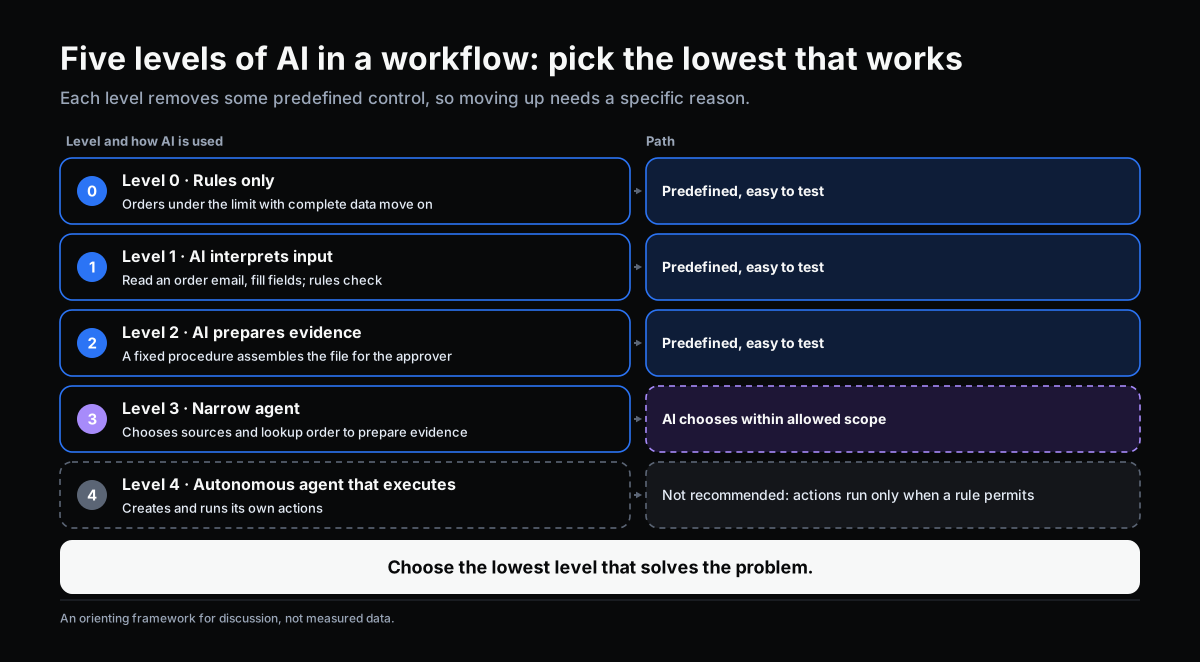
| Level | How AI is Used | Path | Example |
|---|---|---|---|
| 0 | No AI, rules only | Predefined | Order under credit limit with complete information advances to next step |
| 1 | AI interprets input at one step, rules run from there | Predefined | Read an order email, fill order fields, rule checks |
| 2 | AI prepares evidence by a fixed procedure | Predefined | For a held order, always retrieve payment history and similar orders, then present to approver |
| 3 | Narrow agent: chooses sources and lookup sequence to prepare evidence | AI-chosen within allowed scope | A quality complaint file needs to gather data from different sources depending on the case |
| 4 | Autonomous agent executes actions | AI-chosen | Not recommended in operational workflows with risk |
Level 4 appears in the table to mark the boundary, not as a recommendation. An agent that creates actions on its own violates the principle that actions run only when a rule permits. If you want to automate actions, encode them as rules issued by authorized people — and keep AI at the interpreting or evidence-preparation level.
This is an orientation framework for discussion, not an industry-standard classification. What matters is that each level gives up one more piece of predefined control, so there must be a specific reason to move up.
Four Questions to Pick the Right Level

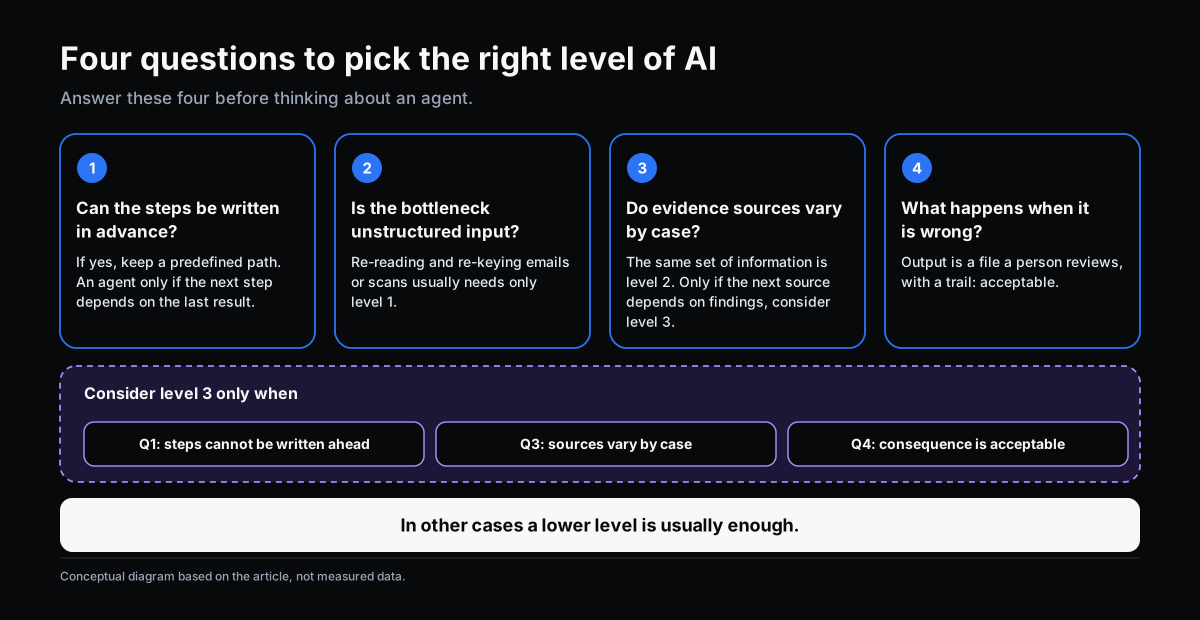
1. Can the steps be written in advance? If you can write “in situation X, do A, then B, then C,” that is work for a predefined workflow. Only when the steps genuinely depend on what is found at the previous step, in a way that cannot be enumerated in advance, is there a place for an agent. Many processes seem “too varied” before they are documented, but once written out have only a handful of branches.
2. Is the bottleneck caused by unstructured input? If work is delayed because someone has to read and re-enter information from emails, scans, or handwritten forms, AI interpretation (level 1) usually solves most of it. Interpreted input then enters rules as normal. No agent needed.
3. Does evidence preparation require traversing sources that vary case by case? If for every case you gather the same set of information (level 2), fixing the preparation procedure is enough and easy to verify. If for each case the sources needed depend on what was just found — for example, a quality complaint may need the raw-material lot, then the supplier, then similar lots — then a narrow agent (level 3) may be worth considering.
4. If something goes wrong, what are the consequences — is it traceable and reversible? An agent trades predictability for flexibility. That is acceptable when the agent’s output is a file for a person to review, and errors will be caught by that person. It is not acceptable when the output goes directly into an action with consequences and no review. Also worth asking: does each run leave a trail sufficient to explain to an ISO/GMP assessor?
Short rule: “no” to question 1 and “yes” to question 3, and question 4 is acceptable — only then is level 3 worth considering. In all other cases, a lower level is usually enough.
The Cost of Moving to a Higher Level
Agents are not free from an operational standpoint. Costs that are often overlooked:
- Harder to test. With a predefined path, you test each branch. With an agent, the number of paths that can occur is much larger, so you need a broader test-case set and continuous monitoring.
- Harder to explain. You must log not just the result but the steps the agent chose, which sources it consulted, and why it stopped.
- Variable cost. The number of model calls varies per case, making cost and latency harder to forecast. For SMEs, this matters because of price/performance constraints.
- Permission risk. The more tools an agent is given access to, the broader the permissions it holds — and the larger the risk surface.
A market signal is also worth noting. In June 2025, Gartner forecast that more than 40% of agentic AI projects would be cancelled before the end of 2027, citing rising costs, unclear business value and insufficient risk controls. This is a forecast, not a measured outcome — but it aligns with the point this article is making: value comes from choosing the right level, not from having an agent.
Three Illustrative Examples

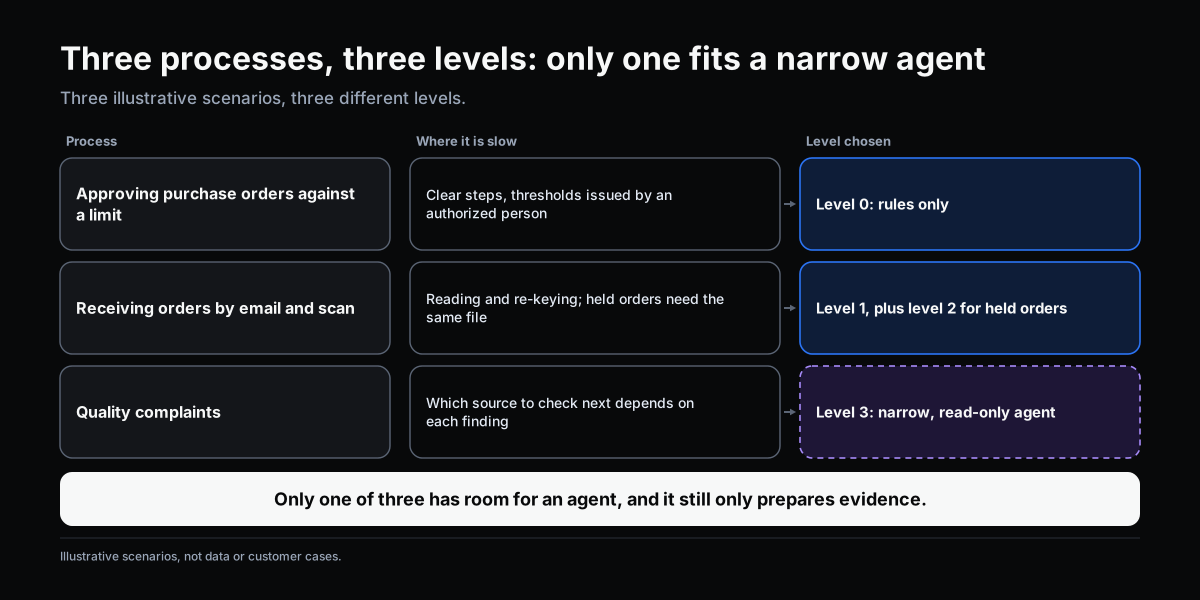
These are illustrative scenarios, not customer cases.
Approving purchase orders by authority limit. Steps are clear, thresholds are set by authorized people, information is already structured in the system. Choose level 0. Adding AI only makes the workflow harder to verify without adding value.
Receiving orders by email and scan. The bottleneck is reading and re-entering. Choose level 1: AI interprets emails into order fields with a certainty score. Fields where AI is not confident go to a person for confirmation. Rules check and continue as before. If an order is held for exceeding a credit limit and the same set of information is always needed (payment history, open orders, notes from the sales team), add level 2 to prepare a ready file for the approver.
Customer quality complaint. Each case differs: some require checking the raw-material lot, some the maintenance log, some comparing with earlier complaints. What to look up next depends on what was just found. This is where level 3 may be worth considering. The agent has read-only access, a cap on the number of steps and sources it may consult, logs every lookup, and delivers a file for the quality manager to decide. The agent does not conclude the root cause; it does not initiate a CAPA on its own.
In all three scenarios, only one has a place for an agent — and the agent still only prepares evidence.
If You Use an Agent, How to Bound It

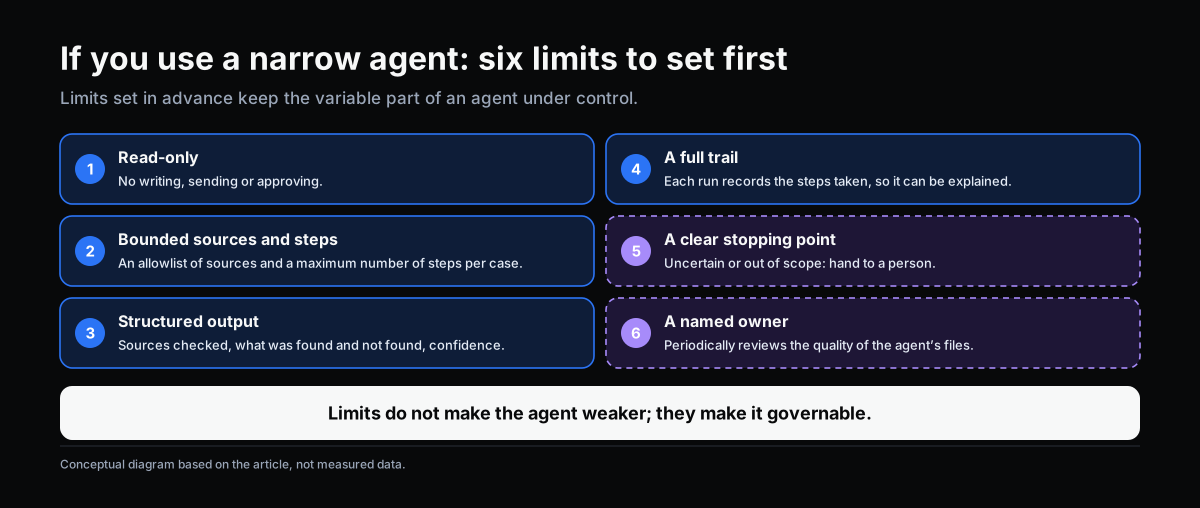
When a step genuinely warrants a narrow agent, the following limits can be applied, consistent with the AI participant governance described in Delegating Workflow Steps to AI:
- Read-only within the task scope. No writing, no sending, no approving.
- An allowlist of permitted sources and a cap on the number of steps per case.
- A clear stopping point: if uncertain, missing information, or out of scope — hand off to a person.
- Structured output: sources consulted, what was found, what was not found, and a certainty level.
- A full trail: each run logs the steps taken, so it can be explained.
- A named accountable person who periodically reviews the quality of the agent’s files.
These limits are not there to make the agent less capable — they are there to turn a variable component into a governable one.
Where to Start
- List where the workflow is slow, and for each point, note the reason: re-reading input, gathering information, or waiting for judgment.
- Try writing the steps on paper for one process. Many processes turn out to need only rules.
- Start at level 1 or 2 for the clearest need, and measure: processing time, the share of cases handed to people, the share of results corrected.
- Only consider level 3 when questions 1 and 3 above genuinely point that way, and a trail already exists that is sufficient to explain.
- Do not grant execution permissions to an agent. If you want to automate actions, encode them as rules issued by authorized people.
Self-Check
- Can this process’s steps be written in advance? Have you tried?
- Is what slows the process unstructured input, gathering information, or waiting for judgment?
- For every case, is the set of information to gather the same?
- If the agent makes an error, who will catch it, at which step?
- Does each run leave a trail sufficient to explain to an assessor?
- Is the agent currently granted write or execution permissions? If so, why?
If two or more make you hesitate, stay at a lower level until these questions are clear.
Conclusion
The question “does our workflow need an AI agent?” usually has the answer: not necessarily, and usually not yet. Most of the value AI brings to a workflow comes from two things — interpreting input so rules can run, and preparing evidence for people to judge — and both can usually be done at simpler, more controllable levels. An agent has its place when evidence preparation genuinely depends on what is discovered step by step; but even then, decision authority does not change.
Choosing the right level is how you capture AI’s value without paying for it in testability, explainability and cost control.
OKELAS’s Digitalization Readiness Assessment helps identify which of your processes are clear enough to begin at a simple level, before thinking about agents.
Sources
- Anthropic (2024). Building Effective Agents. Distinguishes workflow (predefined path) and agent (model-directed), and recommends starting with the simplest solution.
- Gartner (June 2025). Forecast that more than 40% of agentic AI projects will be cancelled before the end of 2027 (press release). This is a Gartner forecast, not a measured figure.
- Parasuraman, R., Sheridan, T. B., & Wickens, C. D. (2000). A model for types and levels of human interaction with automation. IEEE Transactions on Systems, Man, and Cybernetics – Part A, 30(3), 286–297.
Related Articles
- Delegating Workflow Steps to AI: Think at the Task Level, Govern It as a Participant
- Separation of Duties for AI in Workflow: Who Interprets, Who Decides, Who Executes, Who Records
- Automation and AI-Assisted Workflow: Two Different Things, Not Two Rungs on a Ladder
- Where AI Fits in a Workflow: Interpreting Input and Preparing Evidence
Does this describe your organization?
Does this sound familiar to your organization?