
Workflow Automation vs. Intelligent Workflow: Why They're Not the Same
2026-09-23
Executive Summary
- Automation (rule-based automation, such as RPA) does exactly what it was programmed to do — fast, stable, but rigid. It doesn’t “understand” a situation; it executes a condition.
- Gartner introduced the term “hyperautomation” in 2019 for precisely this reason: traditional automation is limited to automating individual tasks and struggles with processes that require decision-making, exception handling, or coordination across systems.
- One of the biggest weaknesses of traditional automation (RPA) is exception handling: whenever a case falls outside the programmed script, the system stops and needs a human to intervene — some industry analyses citing Forrester research suggest the ongoing service cost of maintaining and fixing these exceptions can significantly exceed the initial cost of the tooling.
- Intelligent workflow doesn’t replace automation — it adds the ability to understand context, process unstructured data, and make controlled decisions for the part of the work that pure automation can’t handle.
- The right question isn’t “automation or AI.” It’s: which part of this process fits automation, and which part actually needs an added layer of “intelligence”?
Many companies have already invested in automating their workflow — a process that automatically sends reminder emails, automatically moves a request to the next step once conditions are met, automatically copies data from one system to another. That’s real progress.
But many operations directors then run into a frustrating pattern: automation runs fine for the standard cases, but the moment something is slightly different — a new supplier, an unusual document format, a case where two conditions conflict — the system stops, throws an error, or silently skips it, and everything falls back to manual handling.
This isn’t because the automation “isn’t good enough.” It’s because automation and intelligent workflow are two different concepts, solving two different kinds of problems.
→ Related: Why Employees Still Track Work Through Email and Excel
What Automation Delivers

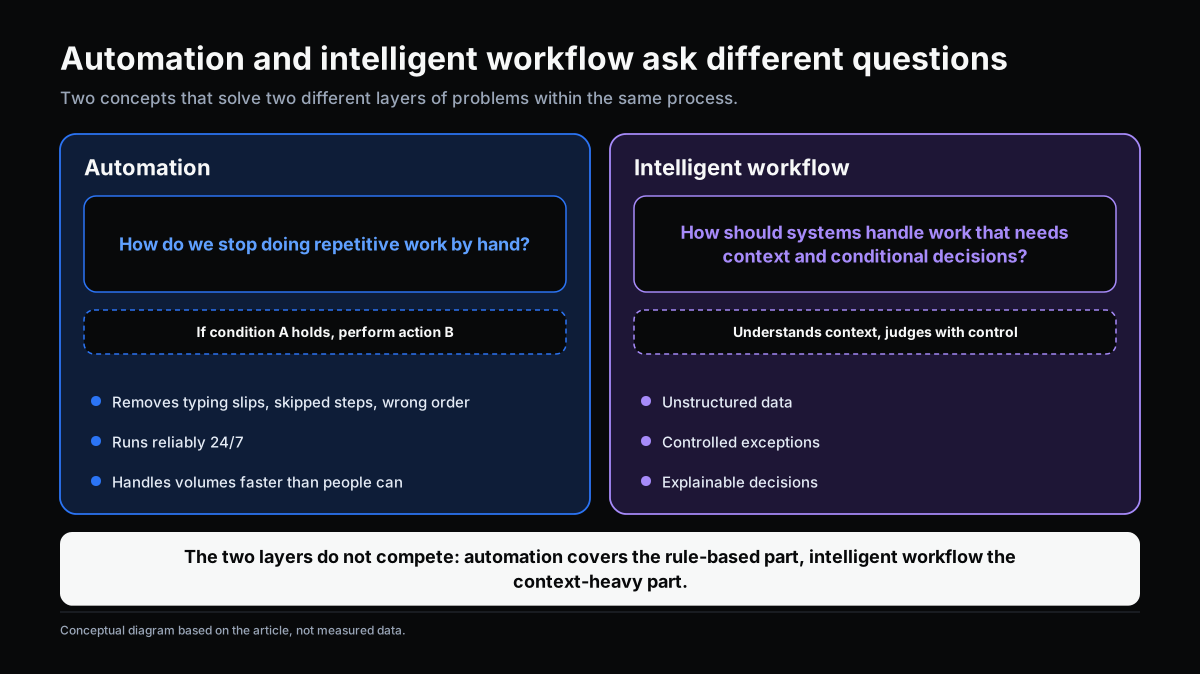
Automation removes the need for people to manually perform repetitive, clearly-ruled tasks.
The most common form is RPA (Robotic Process Automation) — software that mimics human actions on other systems (data entry, copying data, sending notifications) following a fixed script: if condition A is true, take action B.
Automation’s value is real and easy to measure:
- Eliminates errors from typos, skipped steps, or wrong sequencing.
- Runs reliably 24/7, independent of whether a person is available.
- Handles large volumes at a speed people can’t match.
For repetitive, clearly-ruled work with few exceptions, automation is almost always the right choice — fast to deploy, low cost, low risk.
What It Can’t Handle

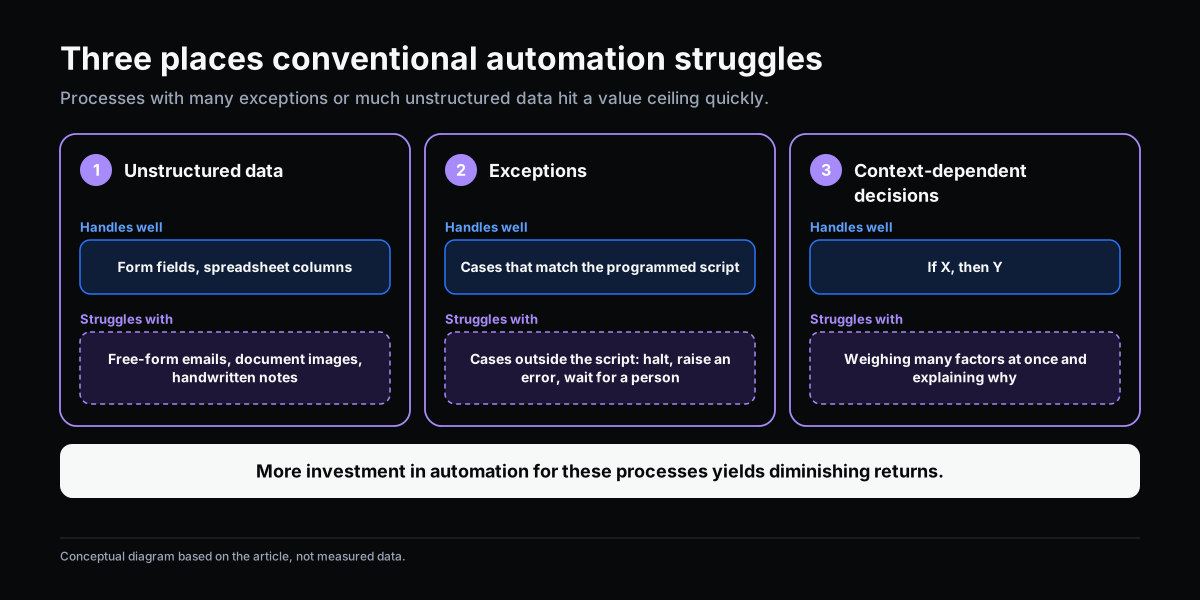
Traditional automation works well within the script it was programmed for, but has no way to handle what falls outside that script.
Gartner introduced the term “hyperautomation” in 2019 for exactly this reason: RPA — a widely adopted and popular approach to automation — is difficult to scale at an enterprise level and is limited in the kinds of automation it can achieve, particularly for processes that require decision-making, exception handling, or coordination across systems.
Specifically, traditional automation struggles with three things:
- Unstructured data. RPA works well with clearly structured data (a form field, a spreadsheet column). It struggles with unstructured data — a free-form email, a scanned document, a handwritten note — which makes up most of the actual data flowing through a company.
- Exceptions. When RPA hits a situation that doesn’t match its programmed script, it doesn’t “reason” its way to a sensible handling — it stops and throws an error, requiring a person to step in. Some industry analyses, citing Forrester research on RPA operating costs, estimate that the ongoing service cost of handling exceptions and maintaining automation over time can significantly exceed the initial cost of the tooling — worth noting this is an aggregated industry estimate, and actual figures likely vary by scale and deployment type.
- Decisions that need context. RPA executes a pre-defined condition (if X, then Y). It can’t produce a recommendation that weighs multiple factors at once, or explain the reasoning behind a suggestion.
If a process has a high exception rate, or most of its input data is unstructured, more investment in traditional automation quickly hits a ceiling — additional spending stops producing proportional improvement.
What Intelligent Workflow Requires
If automation answers “how do we stop doing repetitive work by hand,” intelligent workflow answers a different question: “how does the system handle the parts of the work that require context and conditional judgment?”
Three additional capabilities intelligent workflow needs, beyond pure automation:
1. The ability to process unstructured data. Reading and understanding an email, extracting information from a scanned document, classifying a request written in natural language — this is where language-processing and computer-vision techniques come in, instead of just reading fixed data fields.
2. The ability to handle exceptions in a controlled way. 
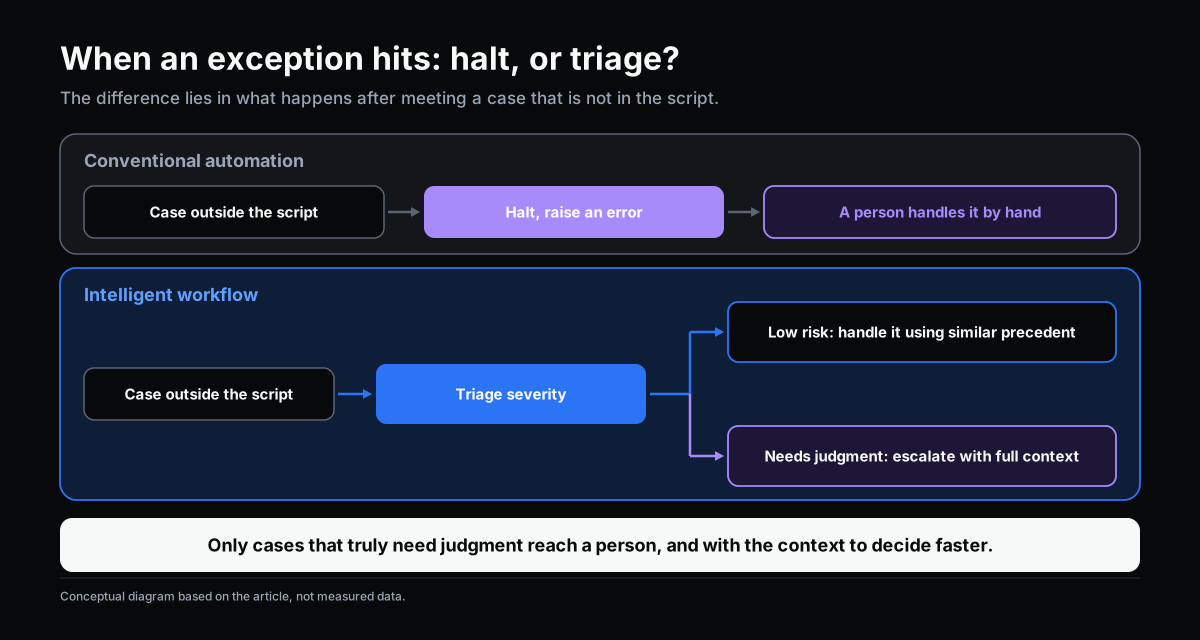 Instead of stopping and throwing an error the moment something unusual appears, an intelligent workflow can classify how serious the exception is, handle low-risk cases automatically based on similar precedent, and only escalate to a human the cases that genuinely need judgment — with full context attached, so the person can decide faster.
3. The ability to explain a decision or suggestion. If the system proposes an action, it needs to be able to show why — based on what data, what precedent — so a person can verify it instead of having to trust it blindly.

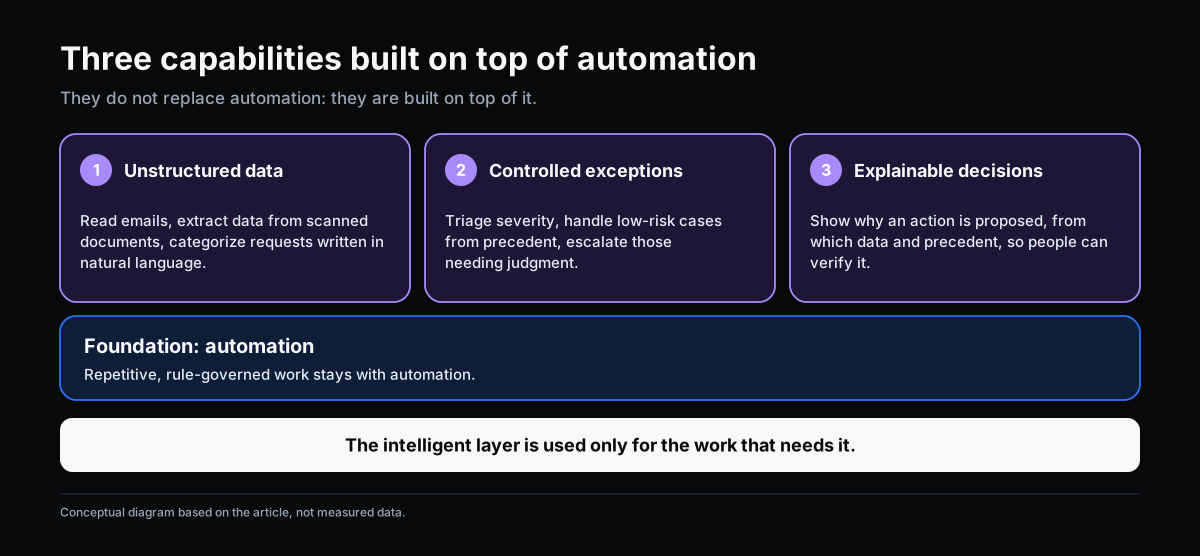
Importantly, these three capabilities don’t replace automation — they’re built on top of it. A good intelligent workflow still uses automation for the repetitive, clearly-ruled part of the work, and reserves the “intelligent” layer for exactly the part that needs it.
When to Move Beyond Automation

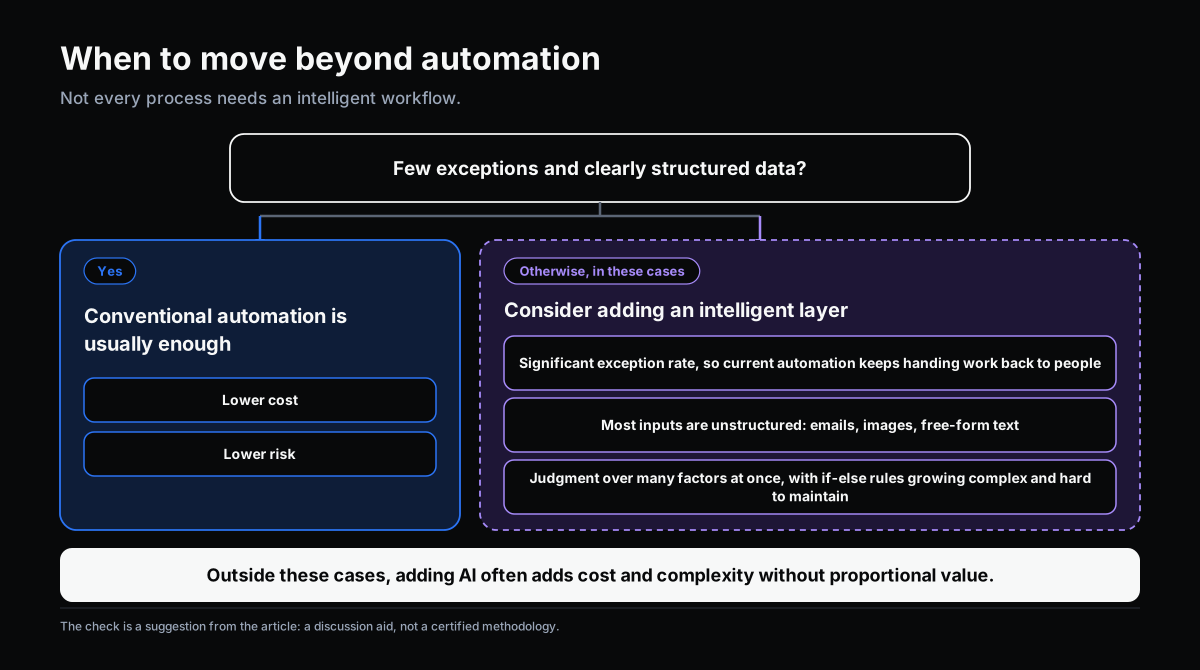
Not every process needs intelligent workflow. A quick test: if a process has a low exception rate and clearly structured data, traditional automation is usually good enough — cheaper and lower risk. It’s worth considering an added intelligent layer only when:
- The process has a meaningful exception rate (for example, more than 15–20% of cases falling outside the standard script), regularly forcing today’s automation to hand off to a person.
- Most of the input data is unstructured (email, images, free text) that traditional automation can’t read.
- The process requires judgment that weighs multiple factors at once, where hard-coding it into if-else rules keeps getting more complex and harder to maintain.
If none of these apply, “adding AI to the workflow” usually just adds cost and complexity without proportional value — consistent with a point made in an earlier article in this series: redesigning the process matters more than adding technology.
→ Related: Next-Generation Workflow: When AI and Organizational Knowledge Change How Work Operates
Conclusion
Automation and intelligent workflow aren’t competing with each other — they solve two different layers of the same process. Automation handles the repetitive, rule-based part. Intelligent workflow handles the part that requires context, exception handling, and controlled judgment. Confusing the two usually leads to one of two mistakes: over-investing in automation for a process with a lot of exceptions, or investing in AI for a simple process that basic automation already handles fine.
This article is part of a series on workflow, AI adoption, and operational management for manufacturing SMEs.
Related articles:
- Why Employees Still Track Work Through Email and Excel
- Workflow Depends Too Much on People: The Design Problem Behind Every Bottleneck
- Next-Generation Workflow: When AI and Organizational Knowledge Change How Work Operates
→ Complete the Digitalization Readiness Assessment
Does this describe your organization?
Does this sound familiar to your organization?